
오라클 클라우드에 무료 관리형 쿠버네티스 서버 구성하기
오라클 클라우드에 무료 관리형 쿠버네티스 서버 구성하기
오늘은 지난 글에 이어서 오라클 클라우드에서 제공하는 관리형 쿠버네티스 서비스인 OKE(Oracle Kubernetes Engine)를 구성해보겠습니다.
VCN이 만들어져 있는 상태여야 하므로 아래의 이전글과 함께 봐주시면 감사하겠습니다.
- 오라클 클라우드로 무료 인프라 네트워크 구성하기: 링크
Private OKE를 위한 네트워크 추가 구성하기
CNI (Container Network Interface)
CNI (Container Network Interface)는 쿠버네티스 내부에서 파드간 통신을 위해 필요한 중요한 요소입니다.
Flannel이라는 플러그인을 주로 사용하는데, 노드에 할당된 IP 주소 범위를 관리하고, 각 노드에 가상 네트워크 인터페이스를 생성해서 파드 간의 통신을 중계하는 역할을 합니다.
OCI의 경우 Flannel을 사용하는 Overlay Network를 구성하는 방법 외에도 VCN Native Pod Networking CNI 옵션을 제공합니다.
application이 VCN의 IP 주소를 사용할 필요가 없고, 워커노드 별로 매우 밀도높은 Pod를 배치하는 경우, Flannel Overlay CNI를 선택할 것을 권고하며, Pod가 VCN의 IP 주소를 필요로하며 안정적인 네트워크 성능을 요구하는 경우 VCN Native 방법을 선택하라고 합니다.
VCN Native 네트워크 구성
Oracle Cloud에 Native한 환경으로 Private Kubernetes 클러스터를 구축하고자 다음 링크의 Example 4를 참고하였습니다.
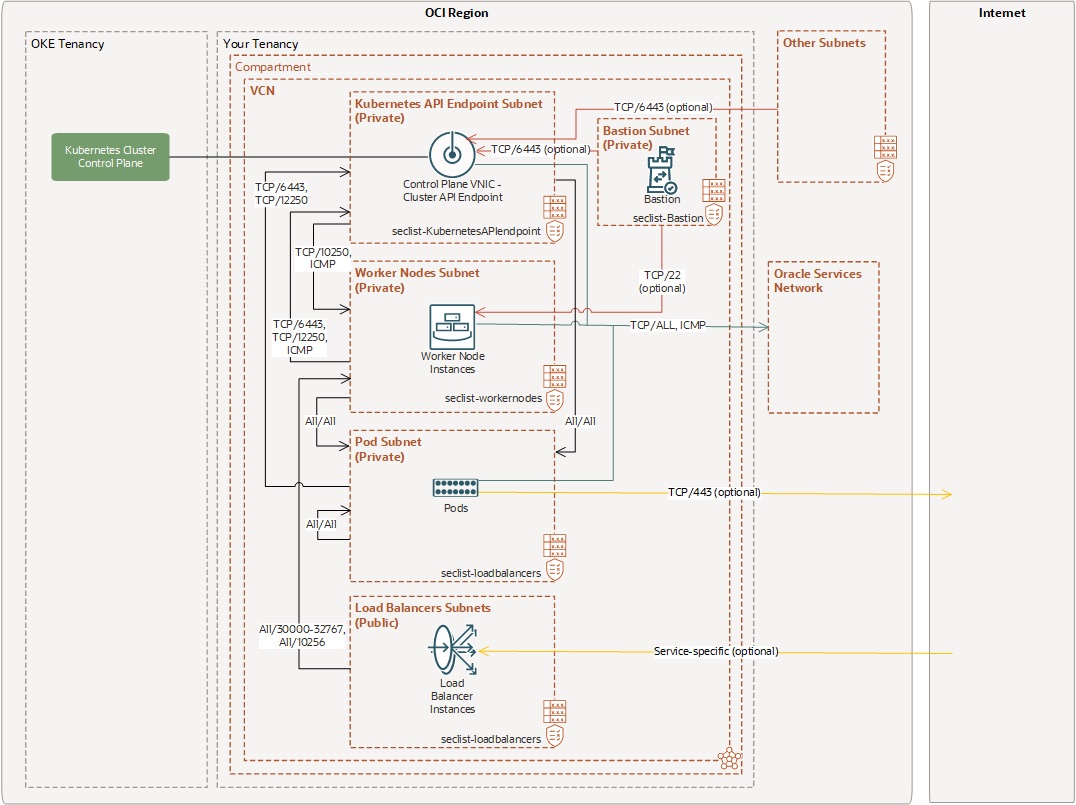
우리는 DMZ 구간인 Public 구간에 Bastion을 구성하였으니, OKE 관련하여 “Kubernetes API Endpoint Subnet”, “Worker Nodes Subnet”, “Pod Subnet”, “LoadBalancers Subnet”이 추가로 구성 필요합니다.
이때 “LoadBalancers Subnet”은 외부에서 접속 할 수 있도록 Public Subnet으로 구성하고, 이외의 나머지 서브넷들은 Private Subnet으로 구성합니다.
Route Table 구성
이제 앞으로 구성할 쿠버네티스 관련 리소스들에서 사용할 Route Table을 먼저 구성합니다.
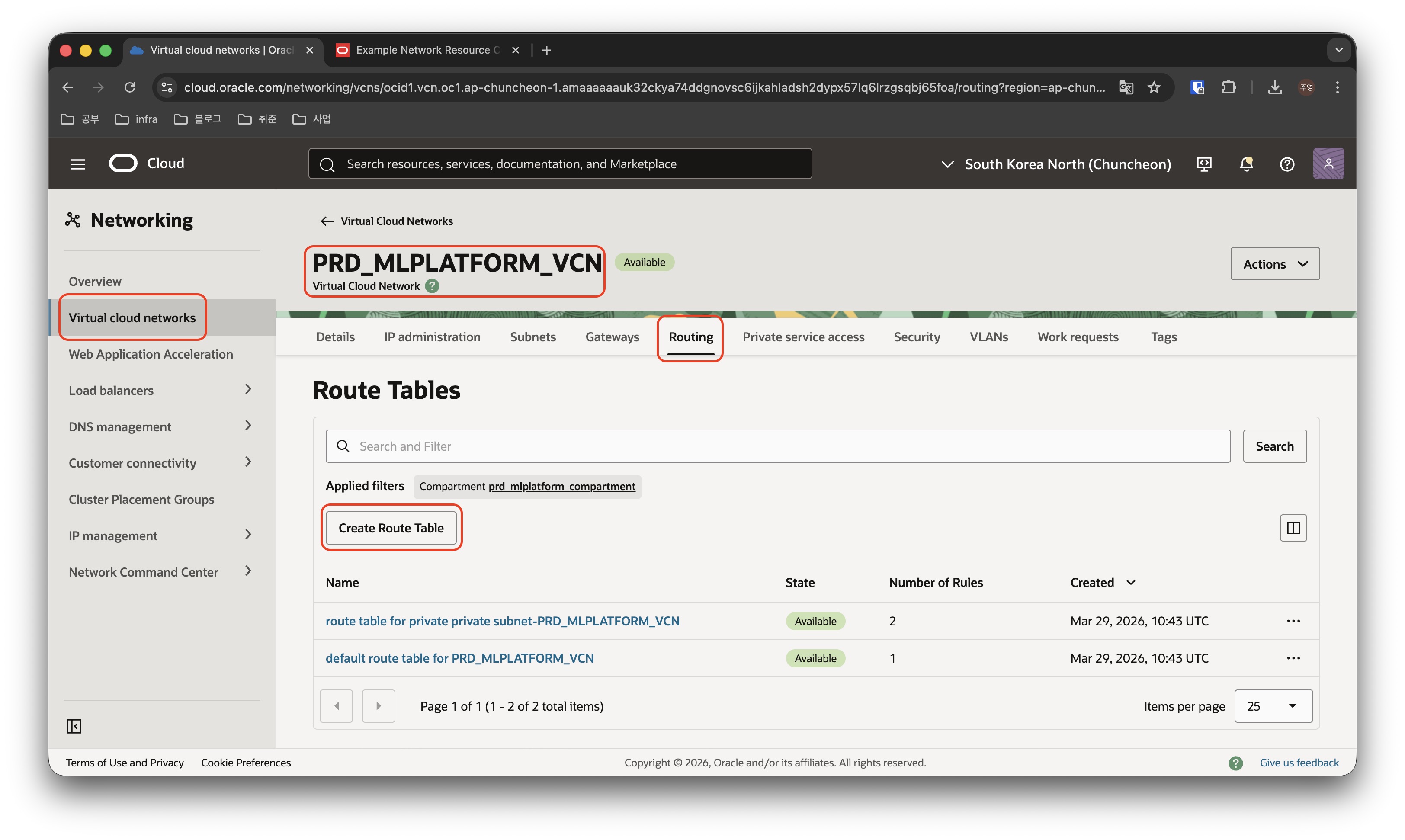
지난 글에서 미리 만들어둔 PRD_MLPLATFORM_VCN에 들어가서 Routing 메뉴를 클릭한 후, Create Route Table을 클릭합니다.
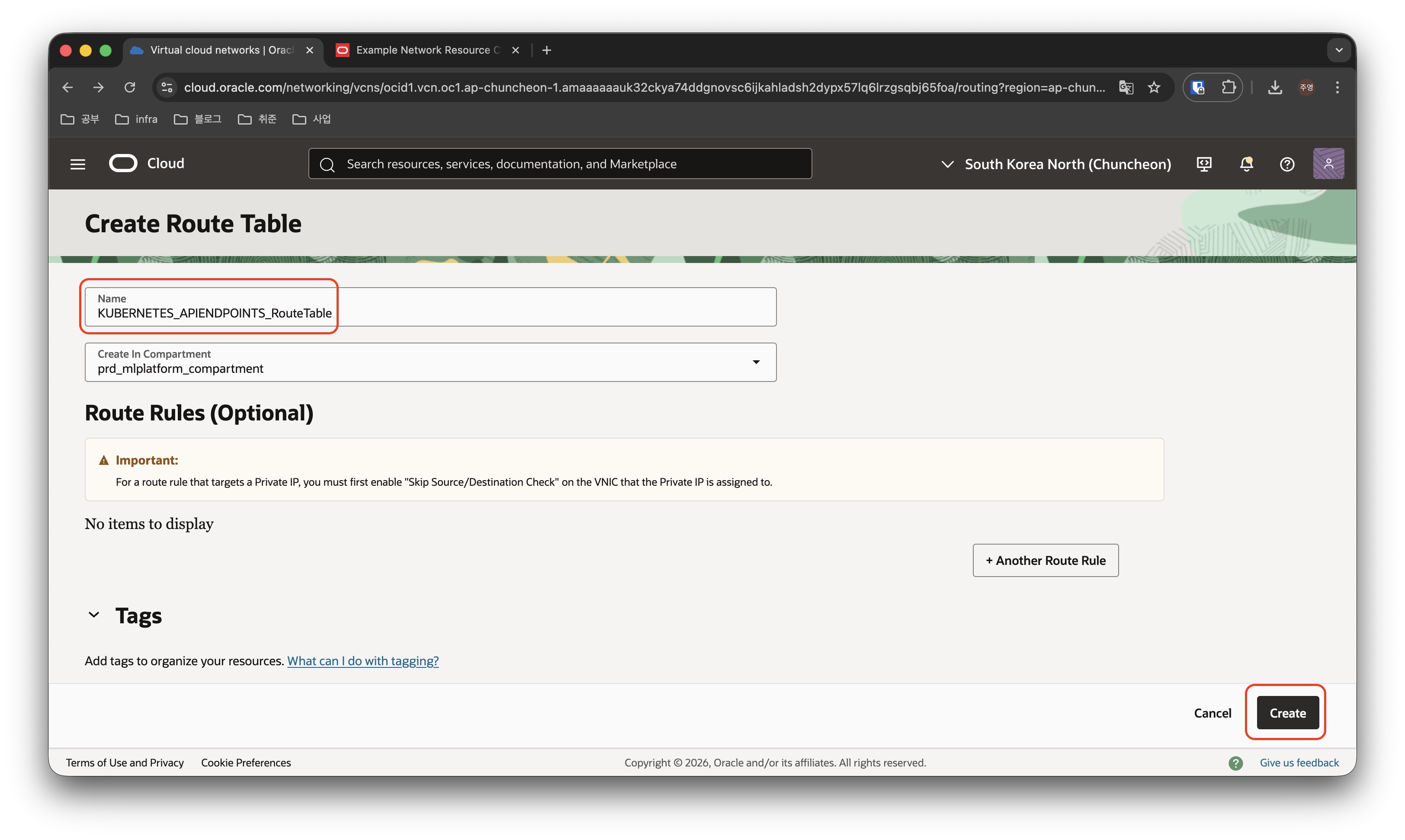
- Route Table의 이름을 입력하고 Route Rule의 규칙을 입력한 뒤, Create 버튼을 클릭하여 생성합니다. ( 저는 명명규칙에 대해 {Application명}_RouteTable을 사용하였습니다. )
- 각 RouteTable에서 사용할 규칙을 정의하여야 하지만 나중에 수정할 수 있으므로 일단 생성만 하고 넘어가겠습니다.
- 위 이미지에서는 Kubernetes API Endpoint를 위한 RouteTable 만을 생성하였지만, 마찬가지 방식으로 WorkerNode, Pod, Loadbalancer에서 사용할 RouteTable도 생성해줍니다.
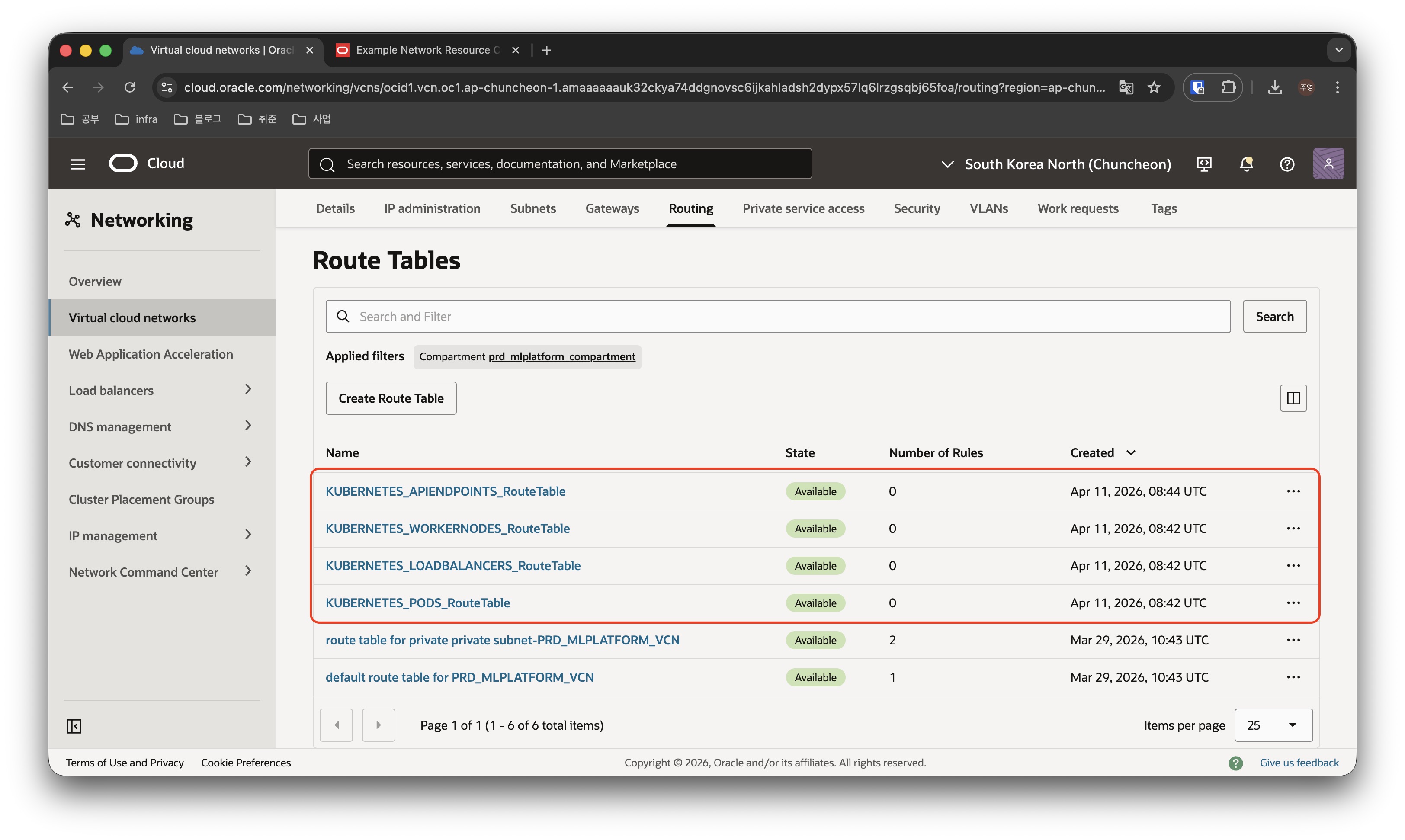
결과적으로 위 이미지와 같이 라우트 테이블을 구성해줍니다.
Security List 구성
Route Table과 유사하게 Security List도 구성해줍니다.
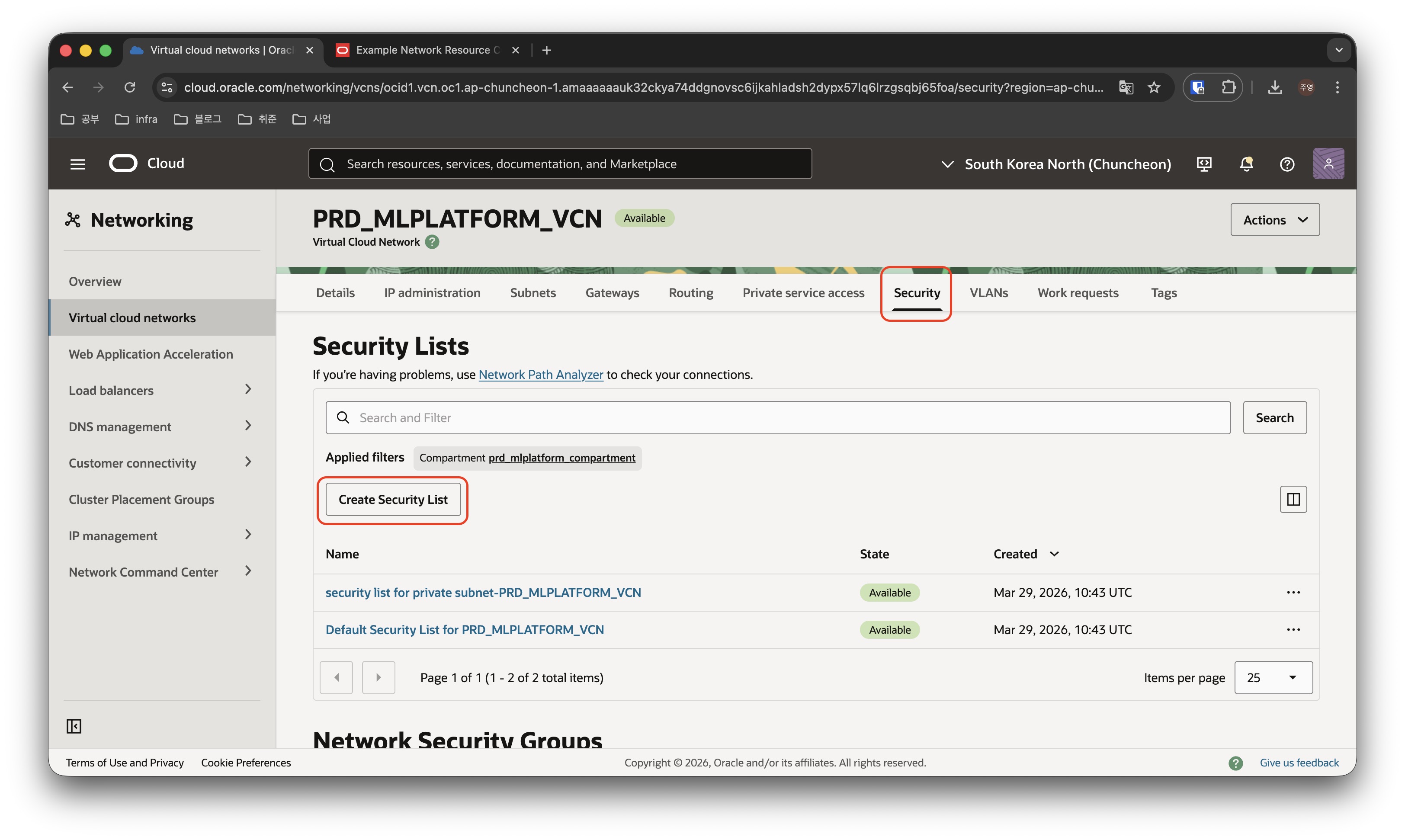
PRD_MLPLATFORM_VCN에서 Security 메뉴를 클릭한 후, Create Security List을 클릭합니다.
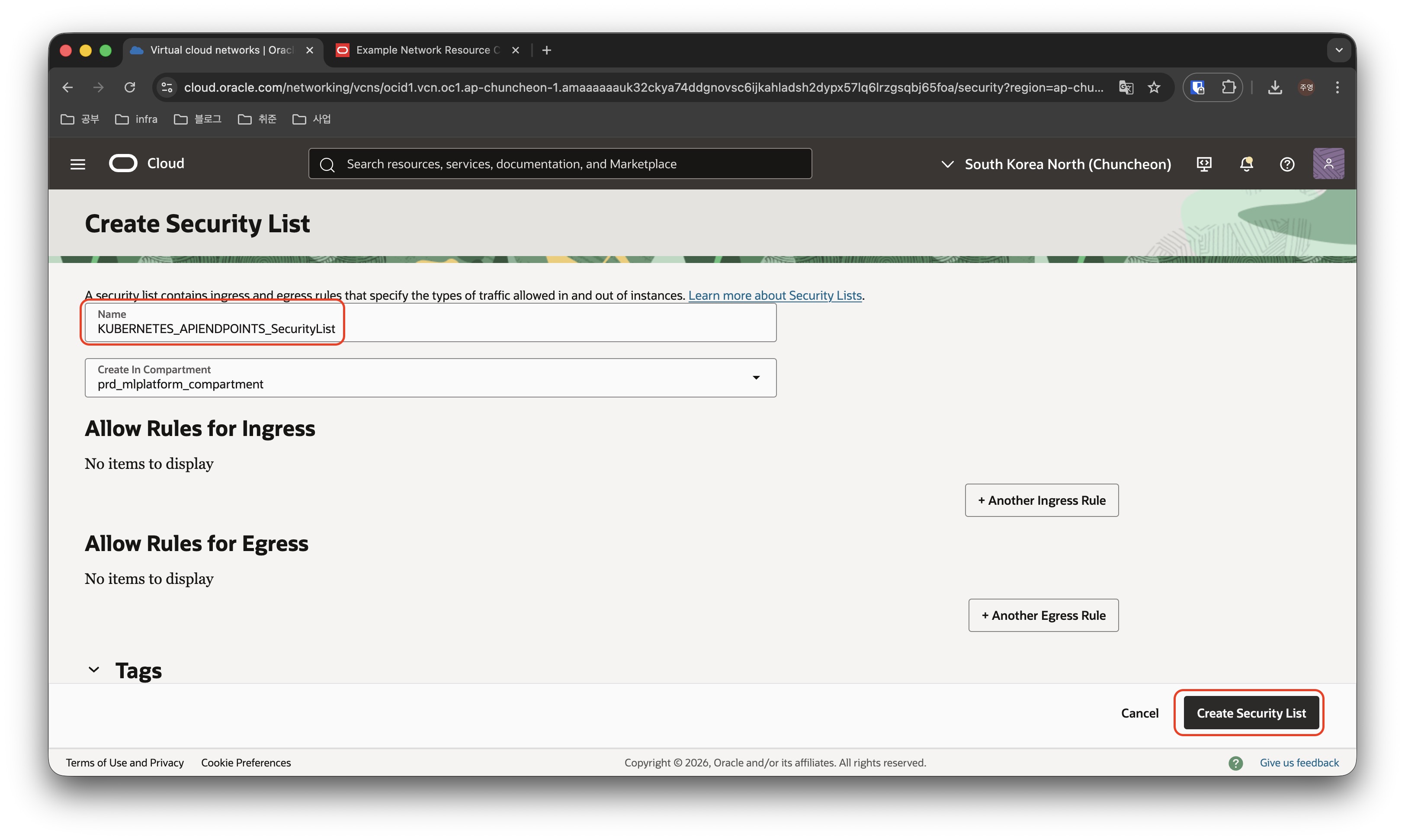
- Security List의 이름을 입력하고 Security Rule의 규칙을 입력한 뒤, Create 버튼을 클릭하여 생성합니다. ( 저는 명명규칙에 대해 {Application명}_SecurityList를 사용하였습니다. )
- 각 Security List에서 사용할 규칙을 정의하여야 하지만 나중에 수정할 수 있으므로 일단 생성만 하고 넘어가겠습니다.
- 위 이미지에서는 Kubernetes API Endpoint를 위한 Security List 만을 생성하였지만, 마찬가지 방식으로 WorkerNode, Pod, Loadbalancer에서 사용할 Security List도 생성해줍니다.
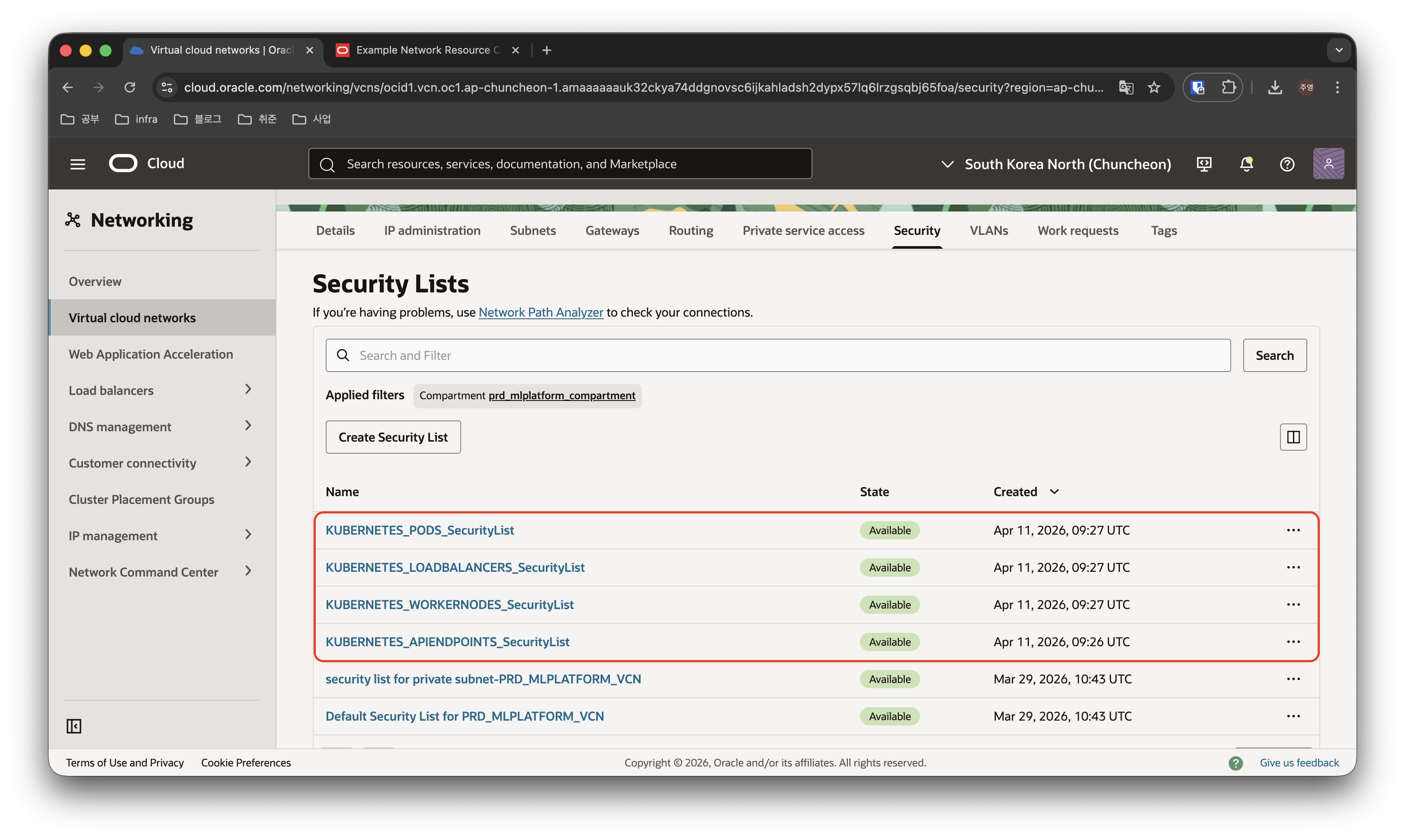
결과적으로 위 이미지와 같이 시큐리티리스트들을 구성해줍니다.
Kubernetes Subnet 구성
이제 본격적으로 Subnet들을 구성하겠습니다.
OCI의 Example에서는 Private Subnet for Kubernetes API Endpoint의 CIDR Block을 10.0.0.0/29로 잡았지만, 우리는 이미 Bastion을 위한 DMZ Subnet을 10.0.0.0/24 로 사용중이므로, CIDR Block이 일부 겹칠 수 있습니다.
따라서 예시에 나온 10.0.0.0/29 대신, 10.0.3.0/29를 사용하겠습니다.
VCN을 만들때 함께 생성되었던 private subnet은 이름을 변경하여 Worker Node 들이 사용할 수 있는 Private Subnet으로 사용하겠습니다.
Load Balancer가 사용할 Subnet은 아직 없으므로 새로 생성하고, Bastion은 DMZ Subnet이 이미 있으므로 추가로 만들지 않겠습니다.
정리하면 아래 표와 같습니다.
| 필요한 Subnet | CIDR Block | 현재 Subnet | CIDR Block | 필요한 작업 |
|---|---|---|---|---|
| Private Subnet for Kubernetes API Endpoint | 10.0.0.0/29 | - | - | 10.0.3.0/29 대역으로 바꿔서 생성 |
| Private Subnet for Worker Nodes | 10.0.1.0/24 | private subnet-PRD_MLPLATFORM_VCN | 10.0.1.0/24 | subnet 이름 변경 |
| Private Subnet for Pods | 10.0.32.0/19 | - | - | 신규생성 |
| Public Subnet for Service Load Balancers | 10.0.2.0/24 | - | - | 신규생성 |
| Subnet for Bastion | 10.0.3.0/24 | DMZ_Subnet | 10.0.0.0/24 | - |
이제 본격적으로 Subnet 생성 작업을 시작하겠습니다.
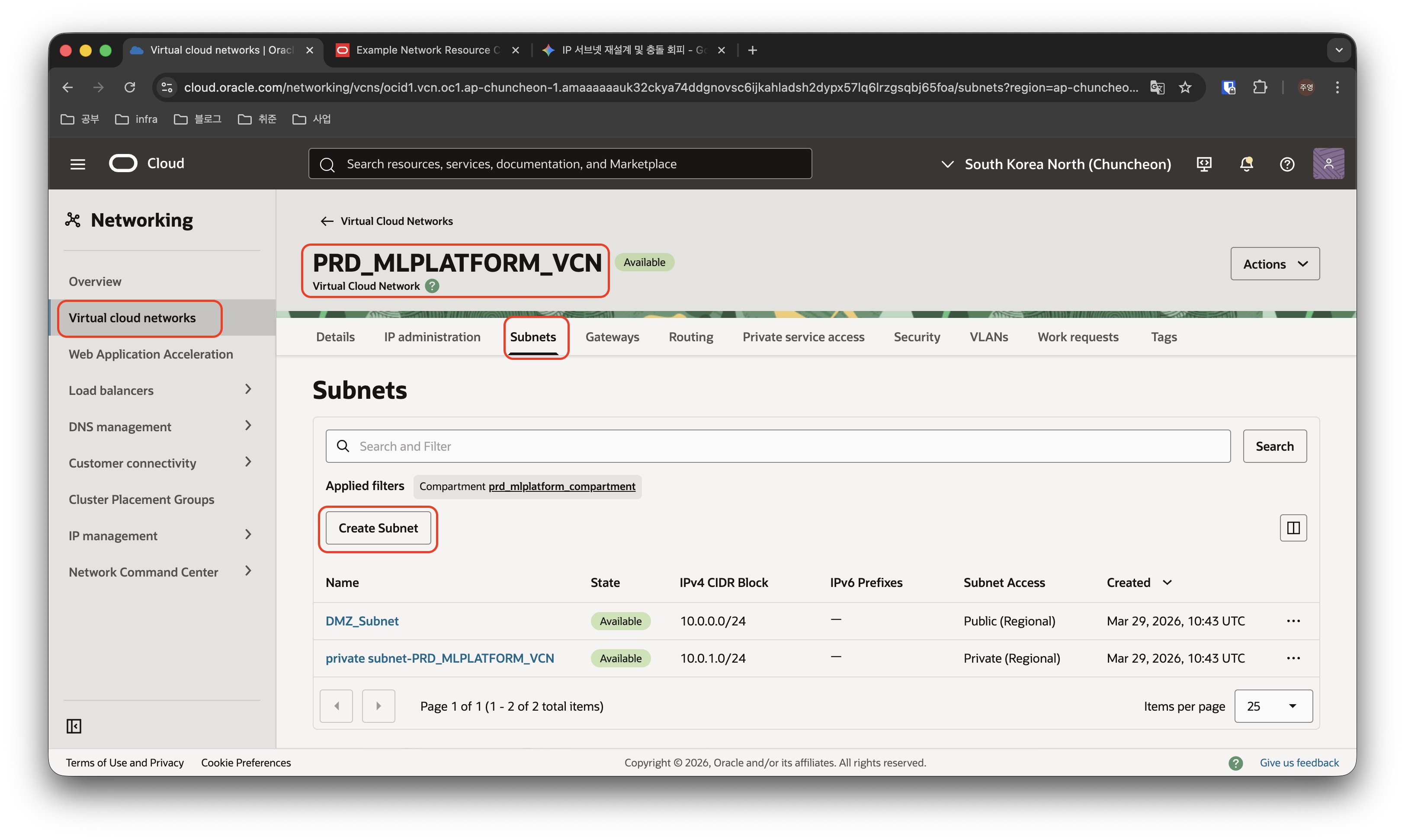
PRD_MLPLATFORM_VCN에서 Subnets 탭을 선택 한 뒤, Create Subnet 버튼을 클릭하여 서브넷을 생성합니다.
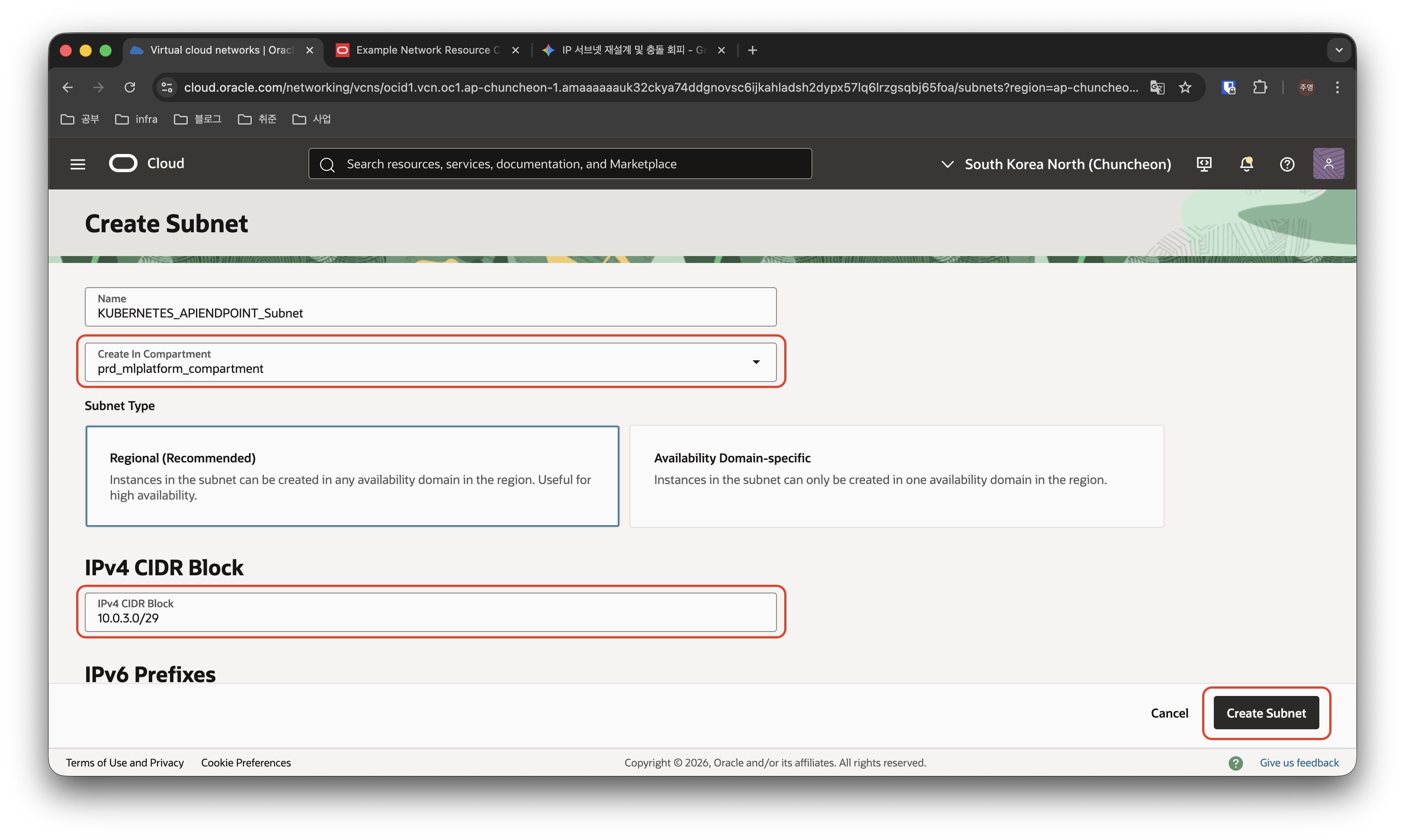
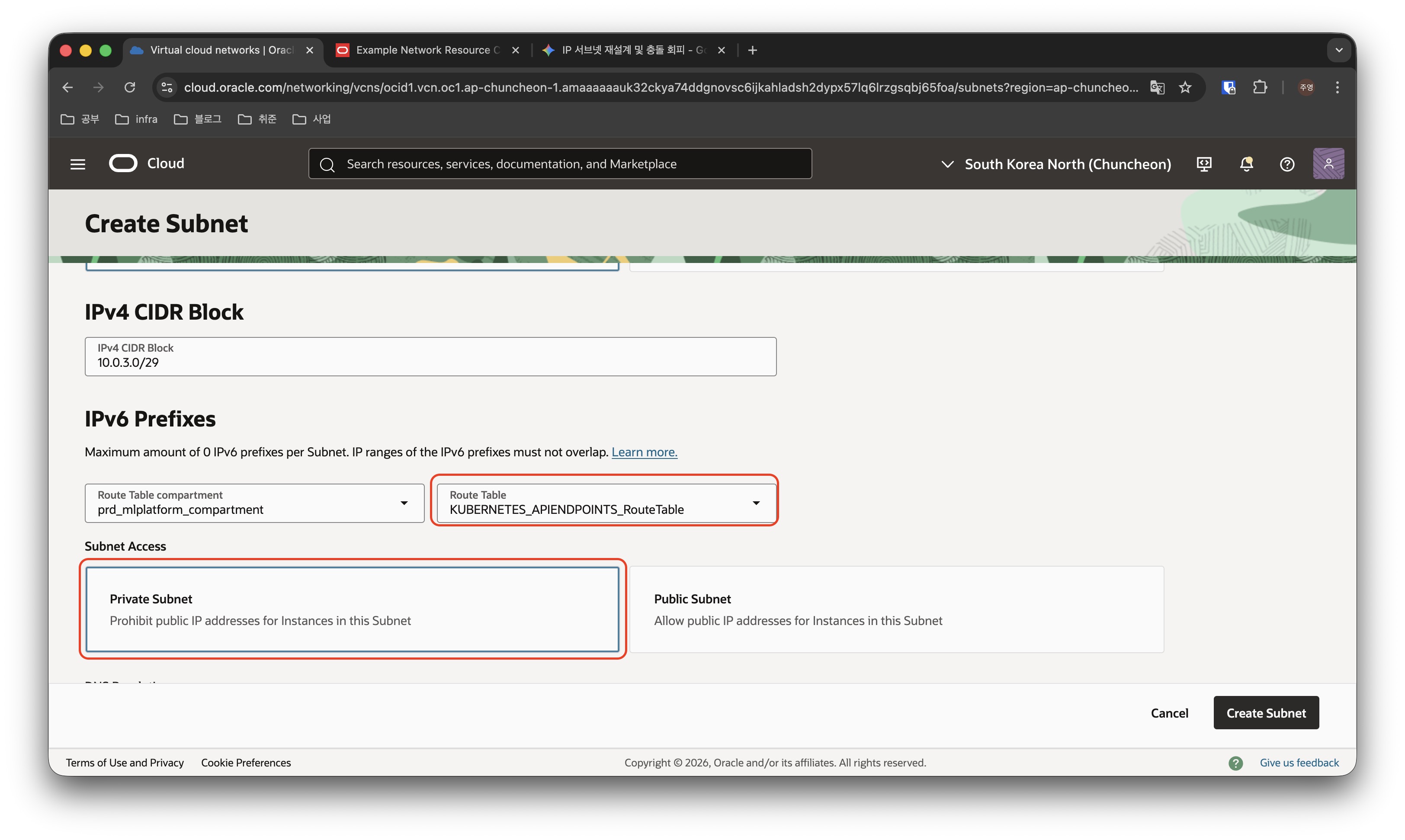
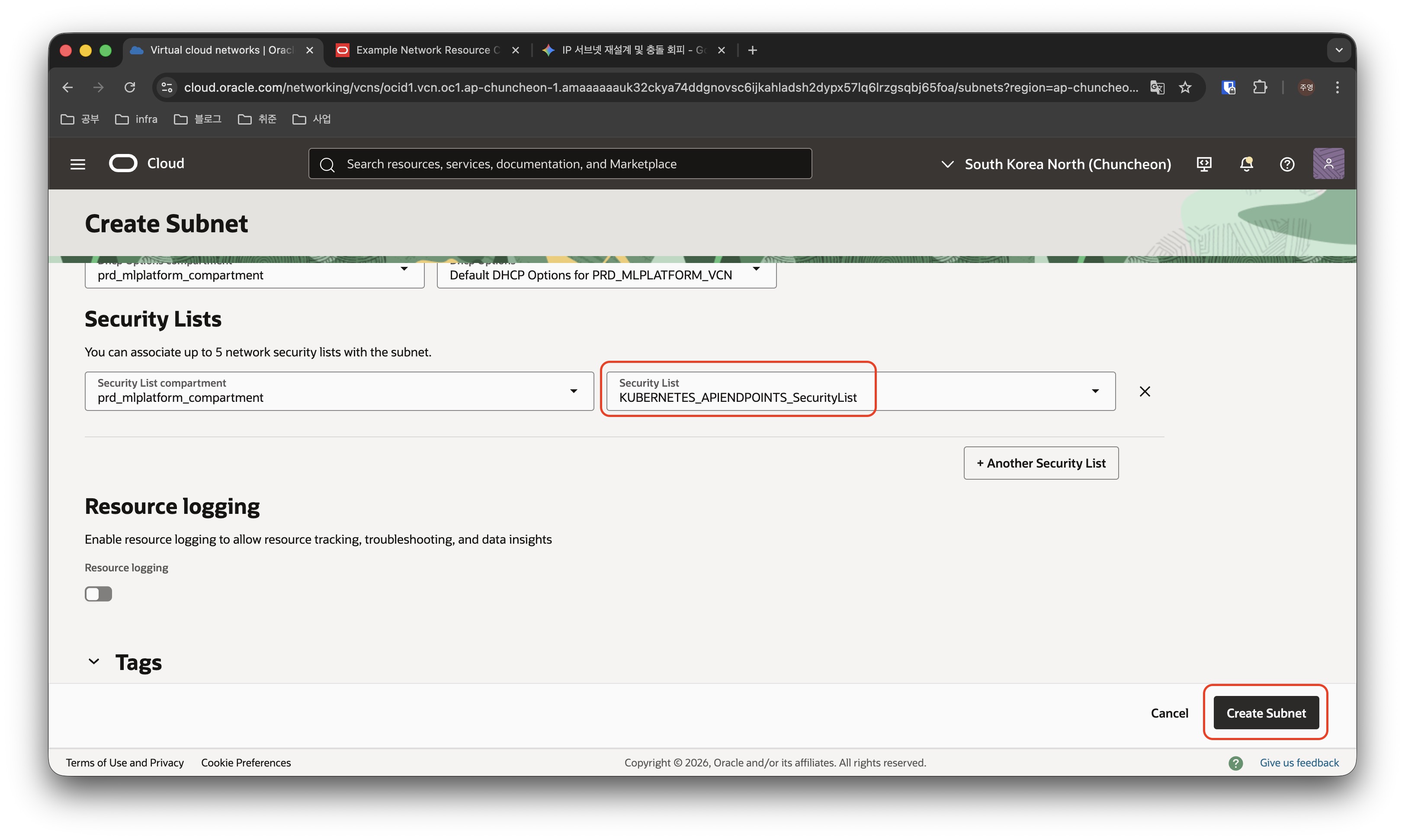
- Subnet의 이름을 명명하고, Subnet에 부여할 CIDR Block의 값을 정합니다.
- Subnet에 적용할 route table을 선택하고, Public/Private 여부도 잘 확인해서 선택합니다.
- 마지막으로 Security list도 잘 선택하고 Create Subnet 버튼을 클릭합니다.
- 비슷한 방식으로 Private Subnet for Pods, Public Subnet for Service Load Balancers 도 생성합니다. Loadbalancer 용 Subnet은 Private이 아닌 Public임에 유의합니다.
이제 기존에 존재하던 Subnet의 이름을 변경합니다.
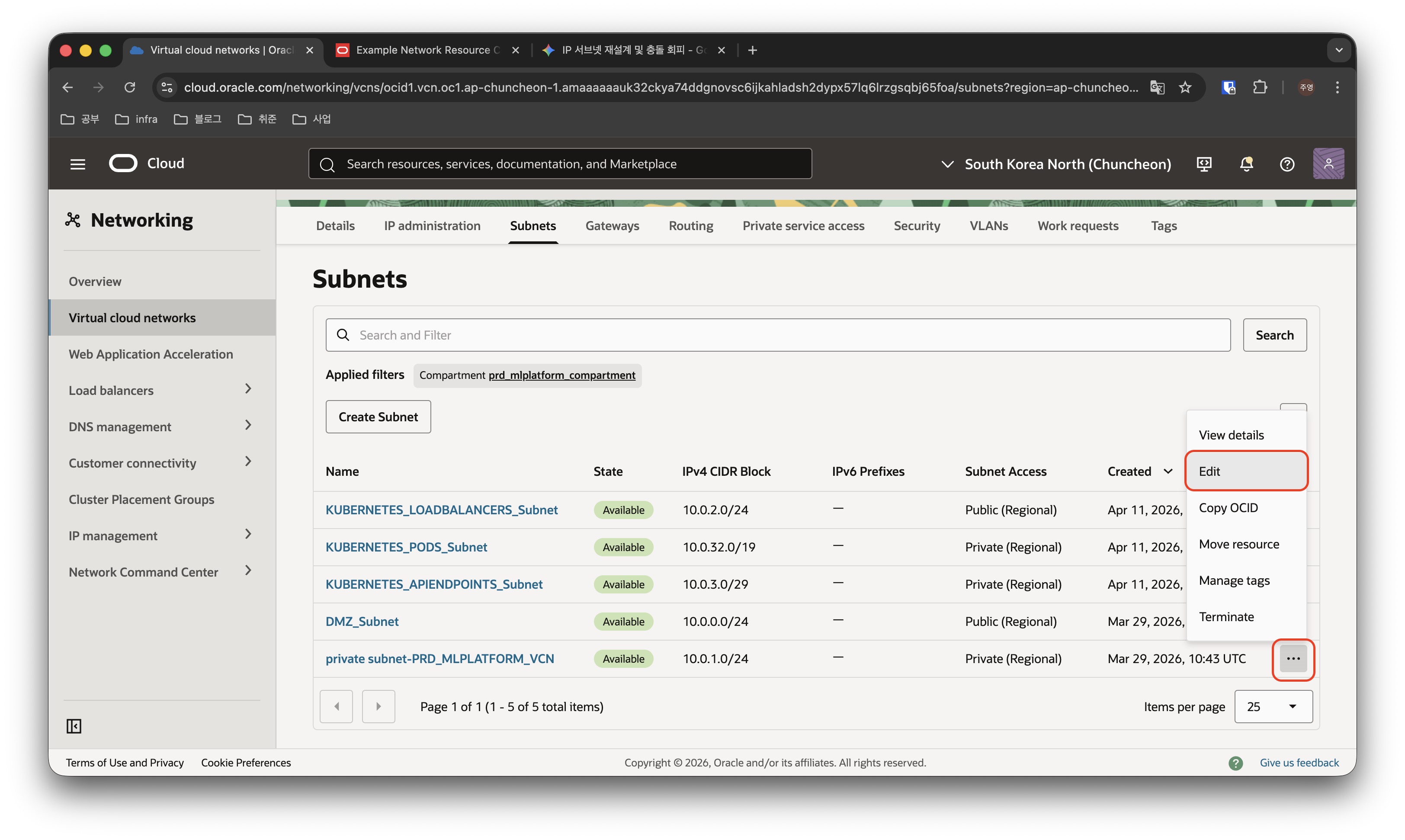
변경할 대상 서브넷의 오른쪽 점세개를 클릭하고 “Edit” 버튼을 클릭합니다.
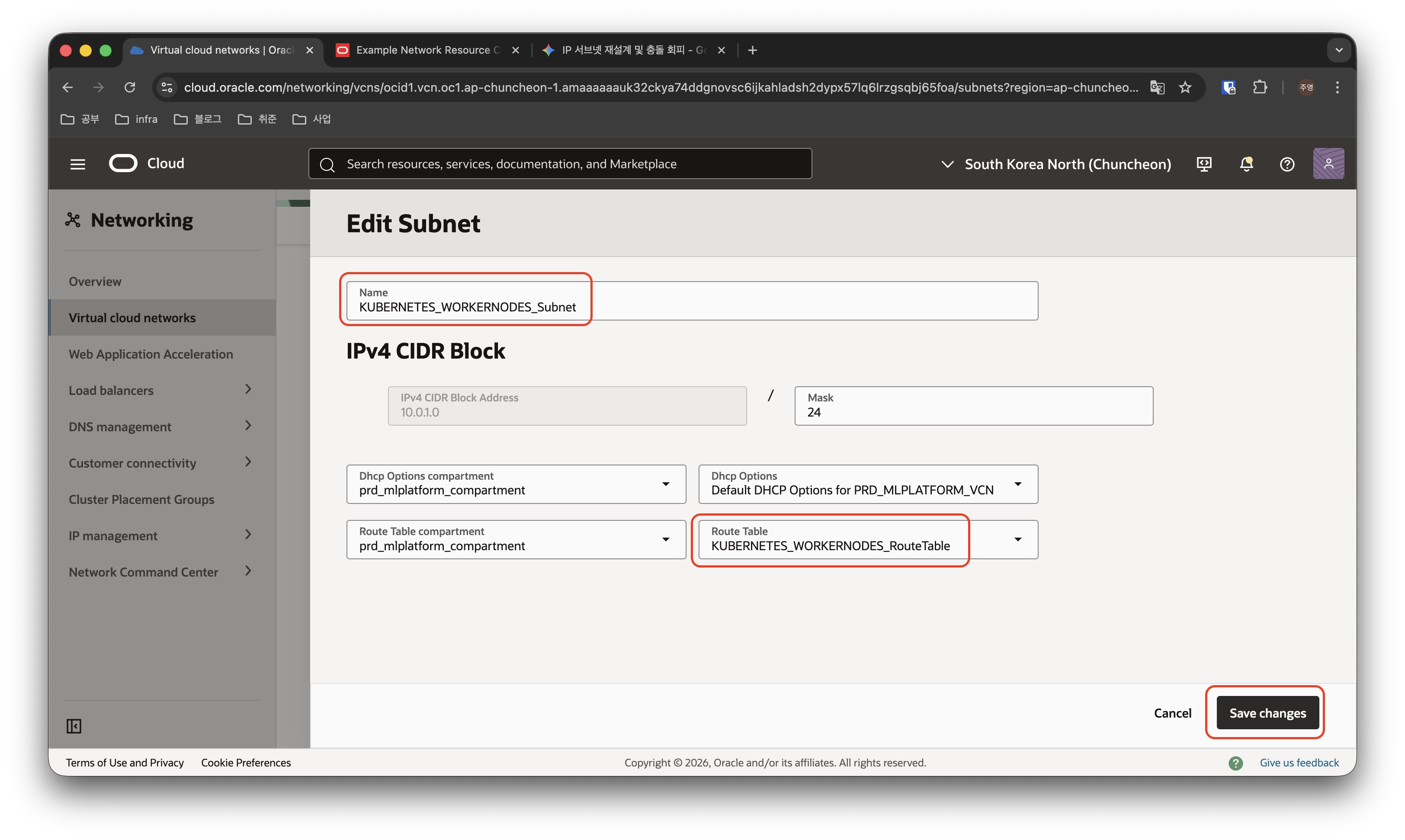
서브넷의 이름과 아까 만든 라우트 테이블을 선택하고 “Save changes” 버튼을 클릭하여 저장합니다.
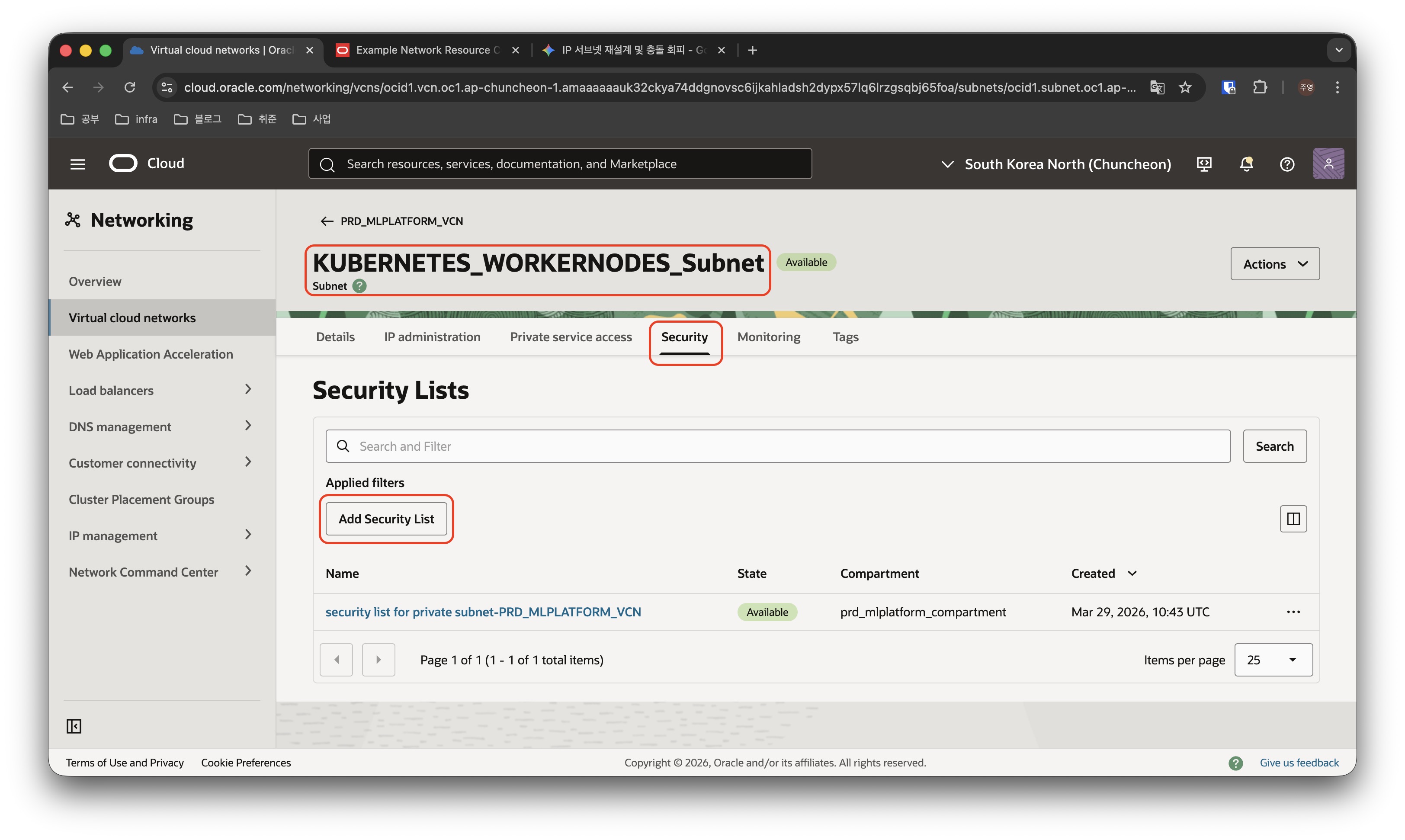
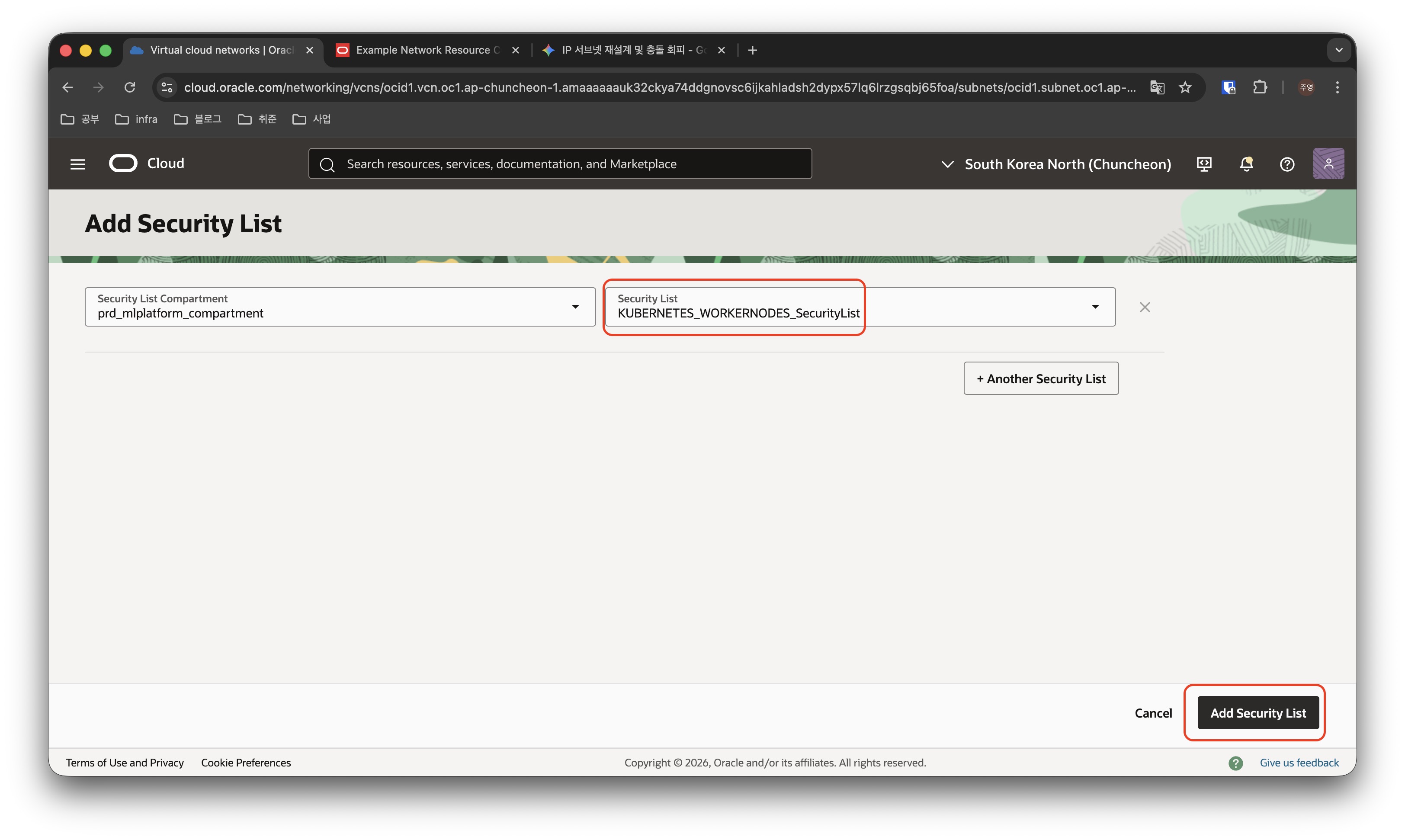
Security List를 변경하기 위해 변경사항이 저장된 Subnet을 클릭하여 상세 페이지로 접속한 뒤, Security 탭을 클릭하여 “Add Security List” 버튼을 클릭하여 아까 만들어둔 Security List를 추가합니다.
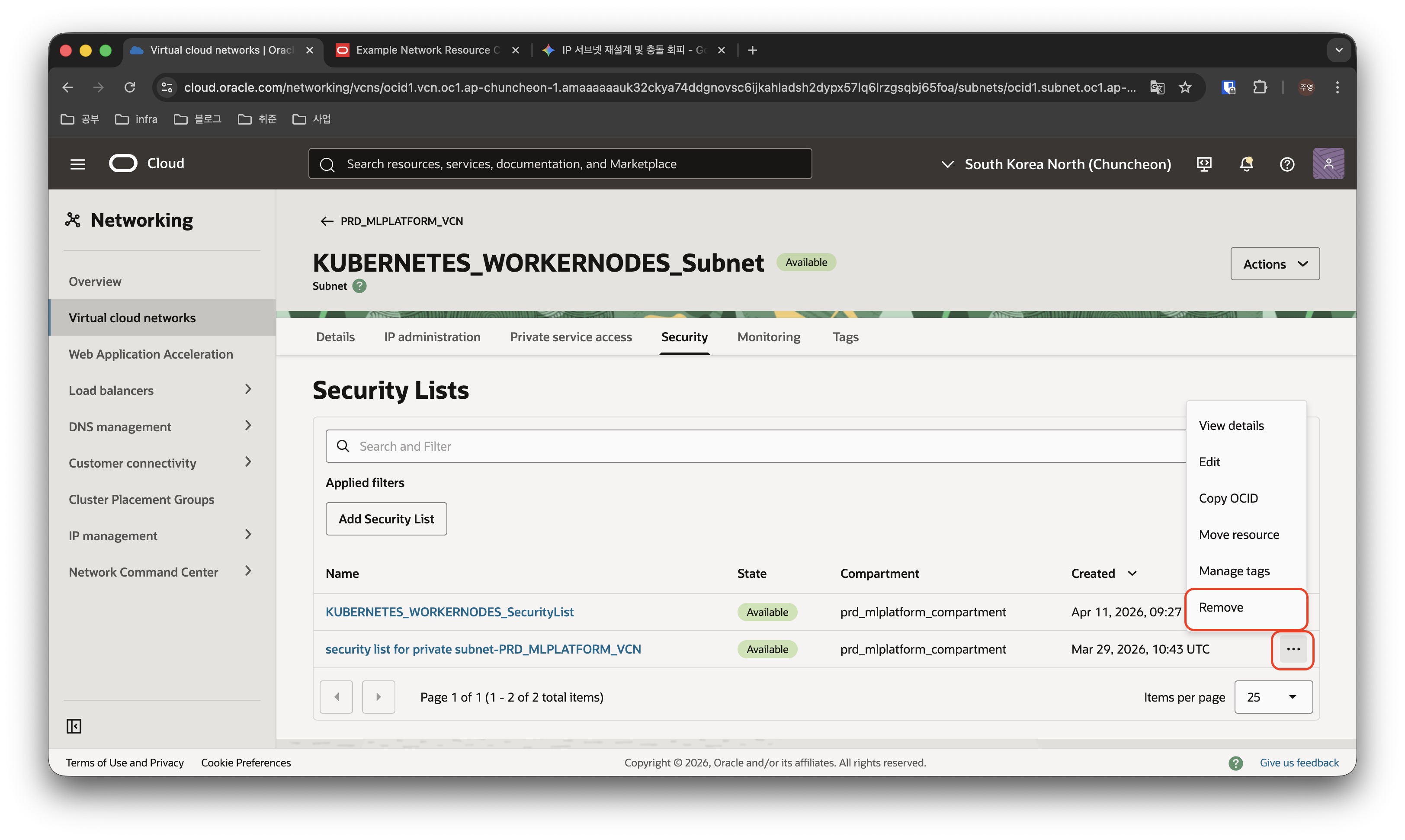
이제 불필요한 기존 시큐리티 리스트는 오른쪽 점세개 버튼을 클릭하여 REMOVE로 제거합니다.
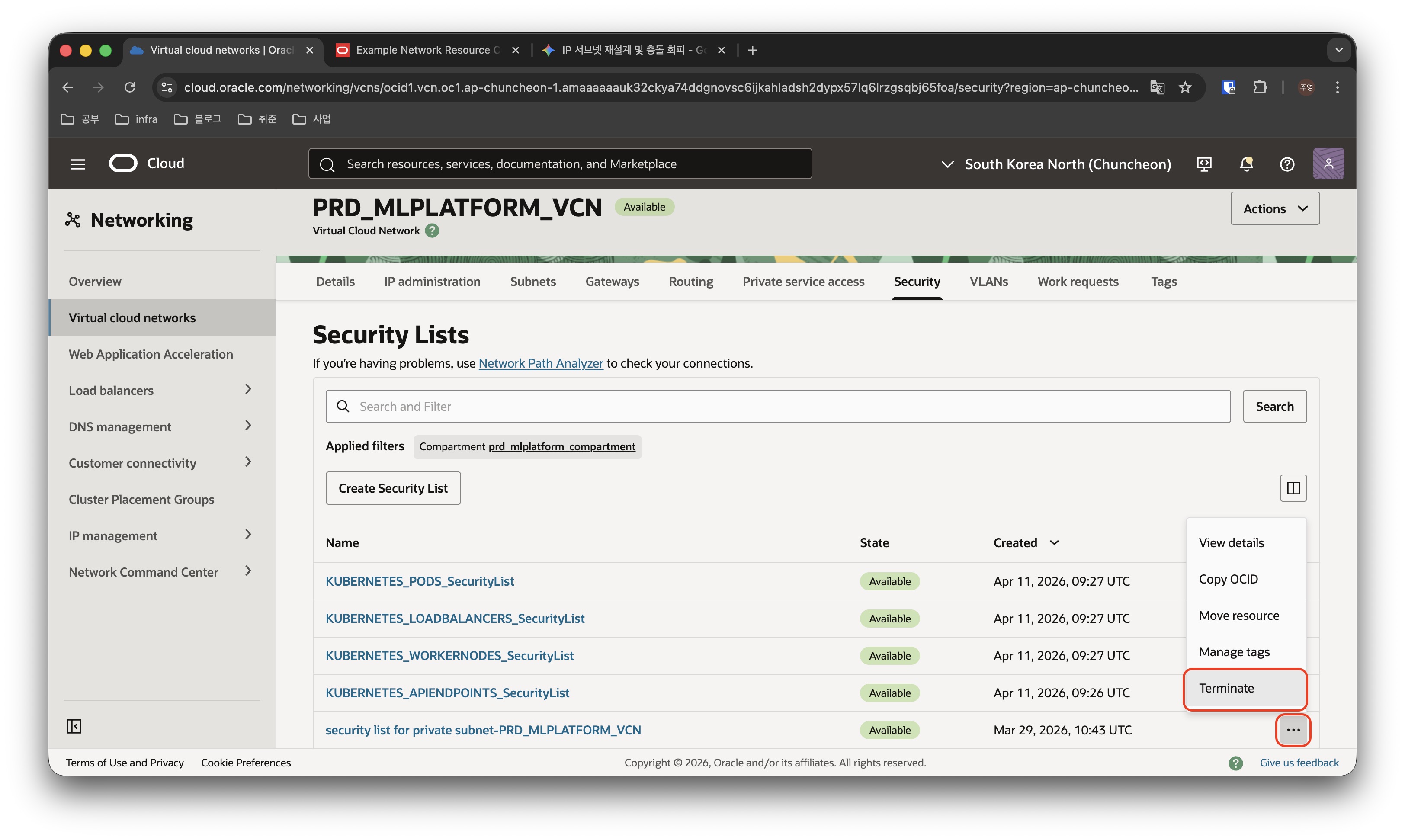
다시 VCN의 Security 탭으로 돌아와서 불필요해진 Security List는 Terminate로 리소스 자체를 삭제합니다.
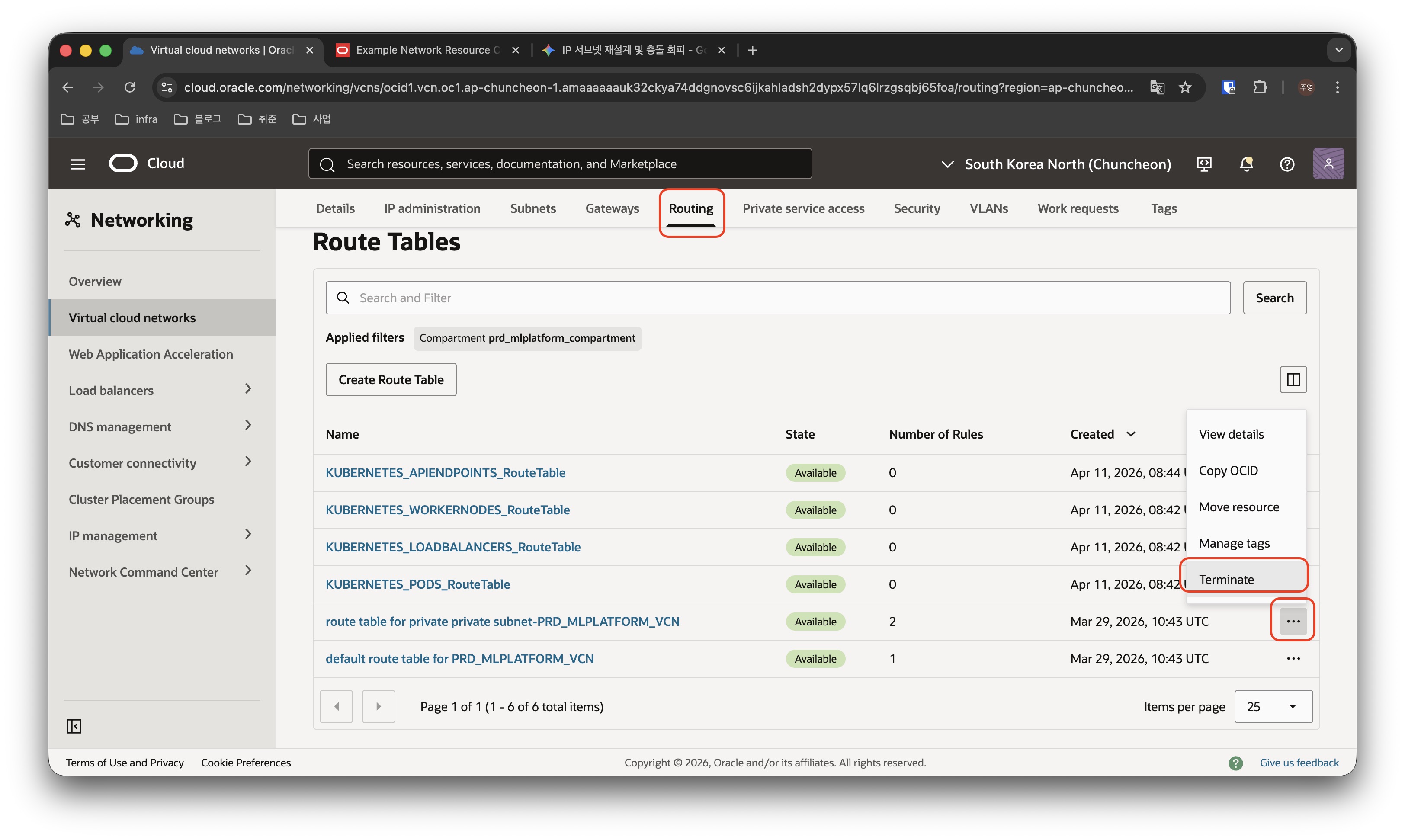
VCN의 Routing 탭에서 불필요해진 Route Table 역시 리소스 자체를 삭제합니다.
저는 DMZ Subnet도 깔끔하게 정리하고 싶어서, 마찬가지로 라우트 테이블 생성, 시큐리티 리스트 생성을 진행하고 기존의 리소스 들은 정리해 줬습니다.
기존의 security list와 route table에 등록된 룰도 확인하여 동일하게 적용해주었습니다. (VCN의 default route table과 security list는 삭제할 수 없어 리소스 자체를 Terminate 하지는 않았습니다.)
Route Table 규칙 추가
이제 생성된 Route Table에 규칙을 추가하겠습니다.
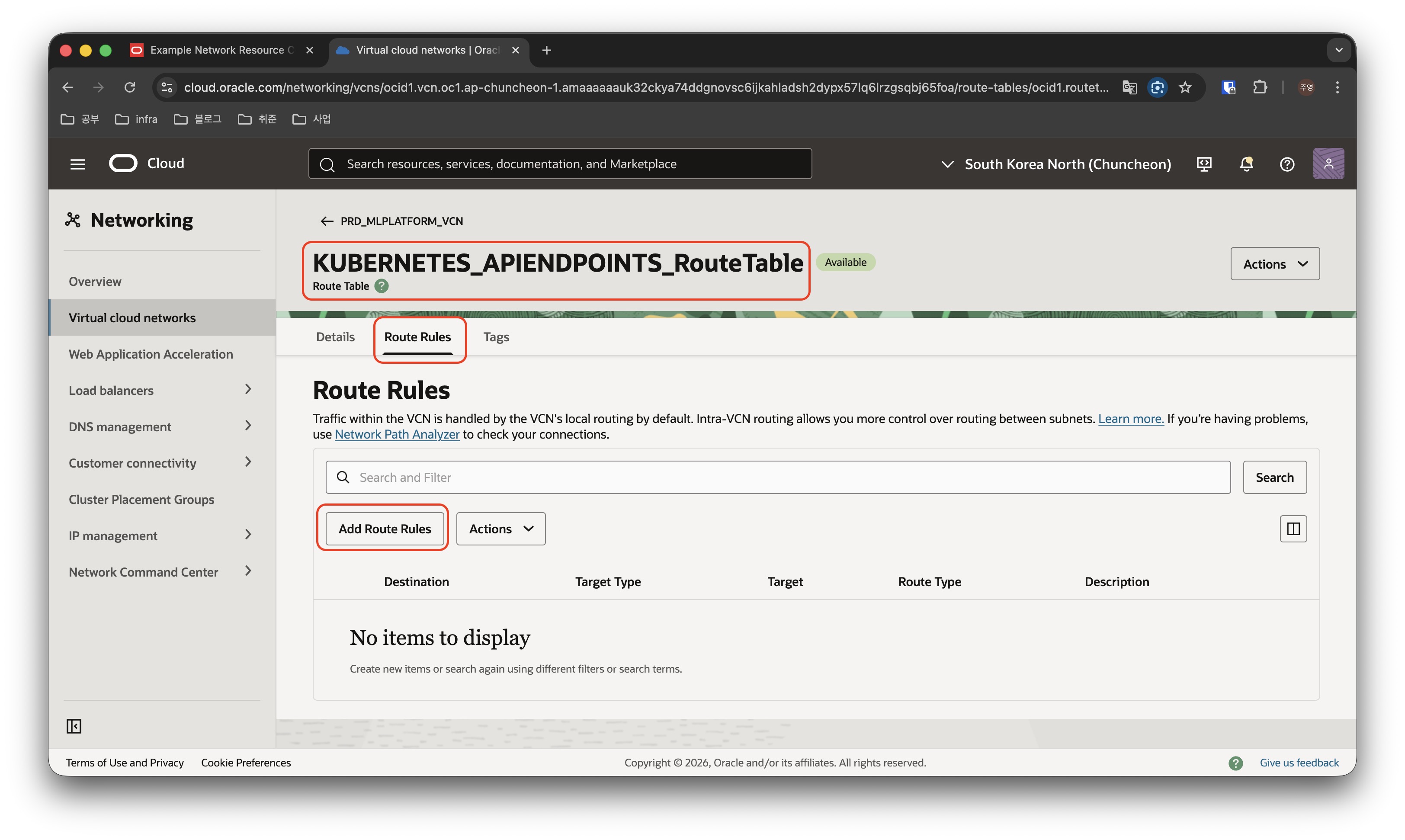
VCN의 Route 메뉴에서 규칙을 수정할 Route Table을 클릭한 뒤 Route Rules 메뉴에 들어가서, Add Route Rules 버튼을 클릭하여 규칙을 추가합니다.
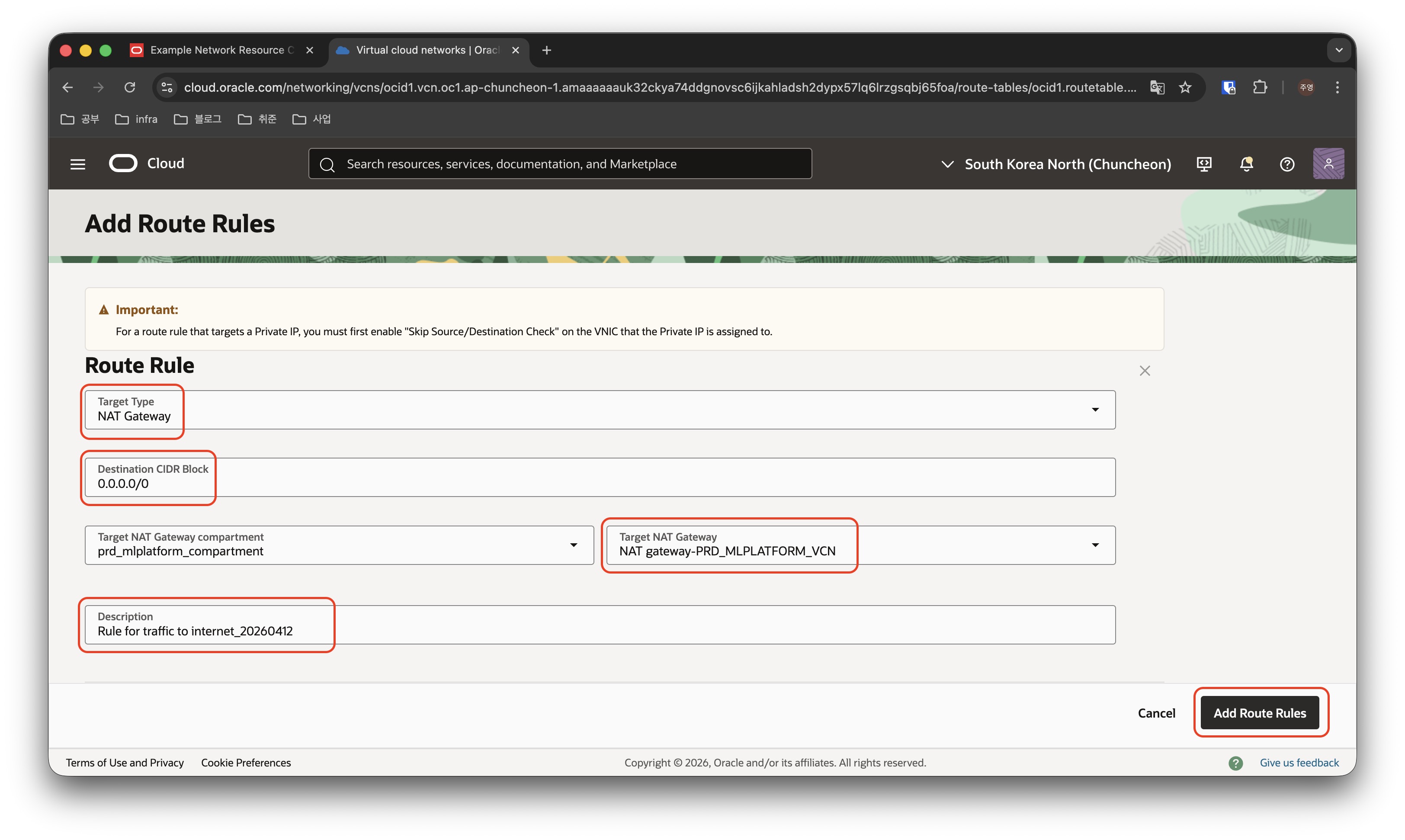
Route Target Type, Destination CIDR Block, Description 등을 선택하고 Save 버튼을 클릭하여 규칙을 추가합니다.
아래 표와 같이 나머지 규칙들도 추가해주겠습니다.
| Route Table | Destination | Target Type | Target | Description |
|---|---|---|---|---|
| KUBERNETES_APIENDPOINTS_RouteTable | 0.0.0.0/0 | NAT Gateway | - | Rule for traffic to internet |
| KUBERNETES_APIENDPOINTS_RouteTable | All |
Service Gateway | - | Rule for traffic to OCI services |
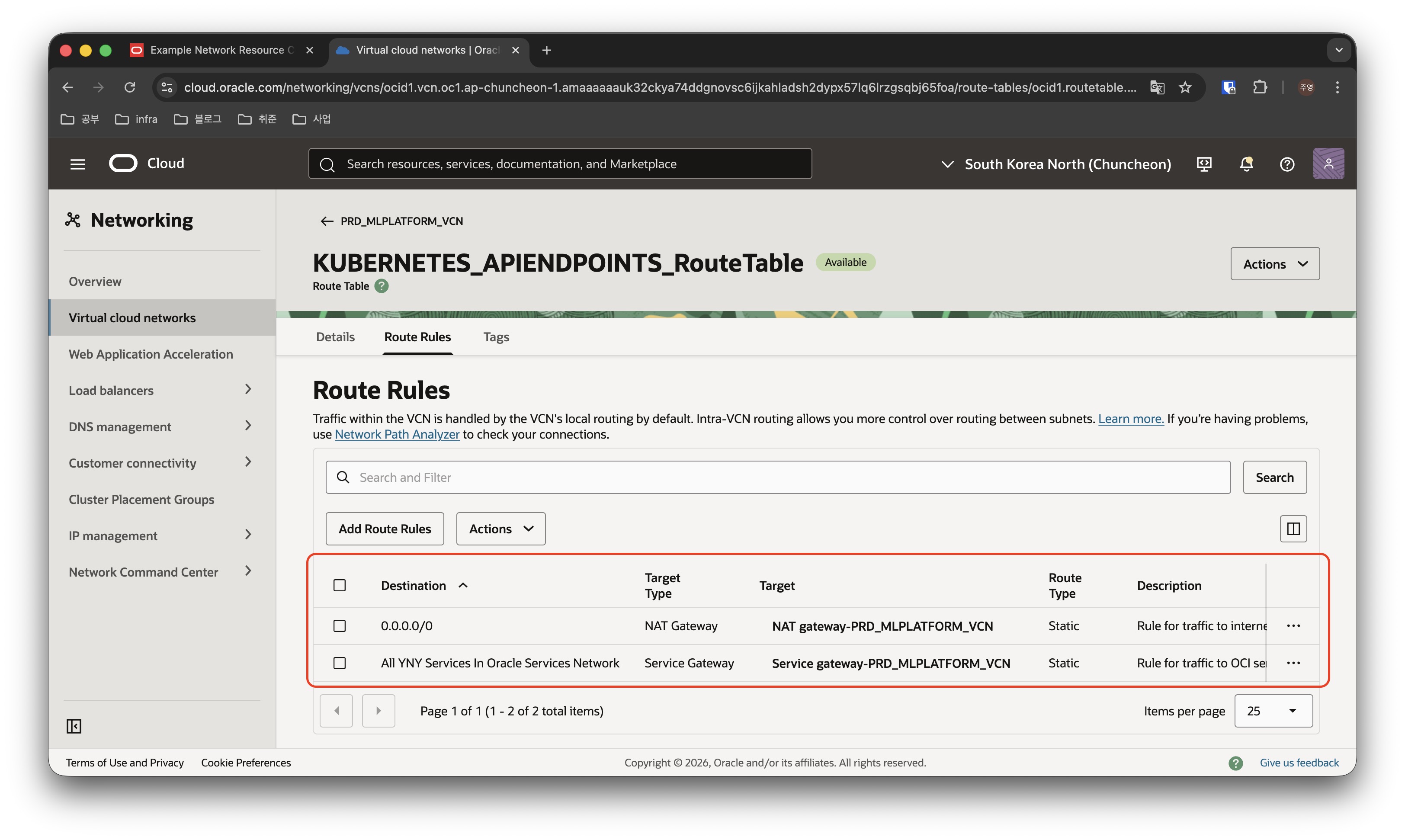
API ENDPOINTS Route Rule은 위와 같이 설정되었고, 나머지 라우트 테이블에 대해서도 같은 방식으로 규칙을 추가해줍니다.
| Route Table | Destination | Target Type | Target | Description |
|---|---|---|---|---|
| KUBERNETES_WORKERNODES_RouteTable | All |
Service Gateway | - | Rule for traffic to OCI services |
| Route Table | Destination | Target Type | Target | Description |
|---|---|---|---|---|
| KUBERNETES_PODS_RouteTable | 0.0.0.0/0 | NAT Gateway | - | Rule for traffic to internet |
| KUBERNETES_PODS_RouteTable | All |
Service Gateway | - | Rule for traffic to OCI services |
| Route Table | Destination | Target Type | Target | Description |
|---|---|---|---|---|
| KUBERNETES_LOADBALANCERS_RouteTable | 0.0.0.0/0 | Internet Gateway | - | Rule for traffic to internet |
Security List 규칙 추가
Route Table과 유사한 방식으로 Security List에도 규칙을 추가합니다.
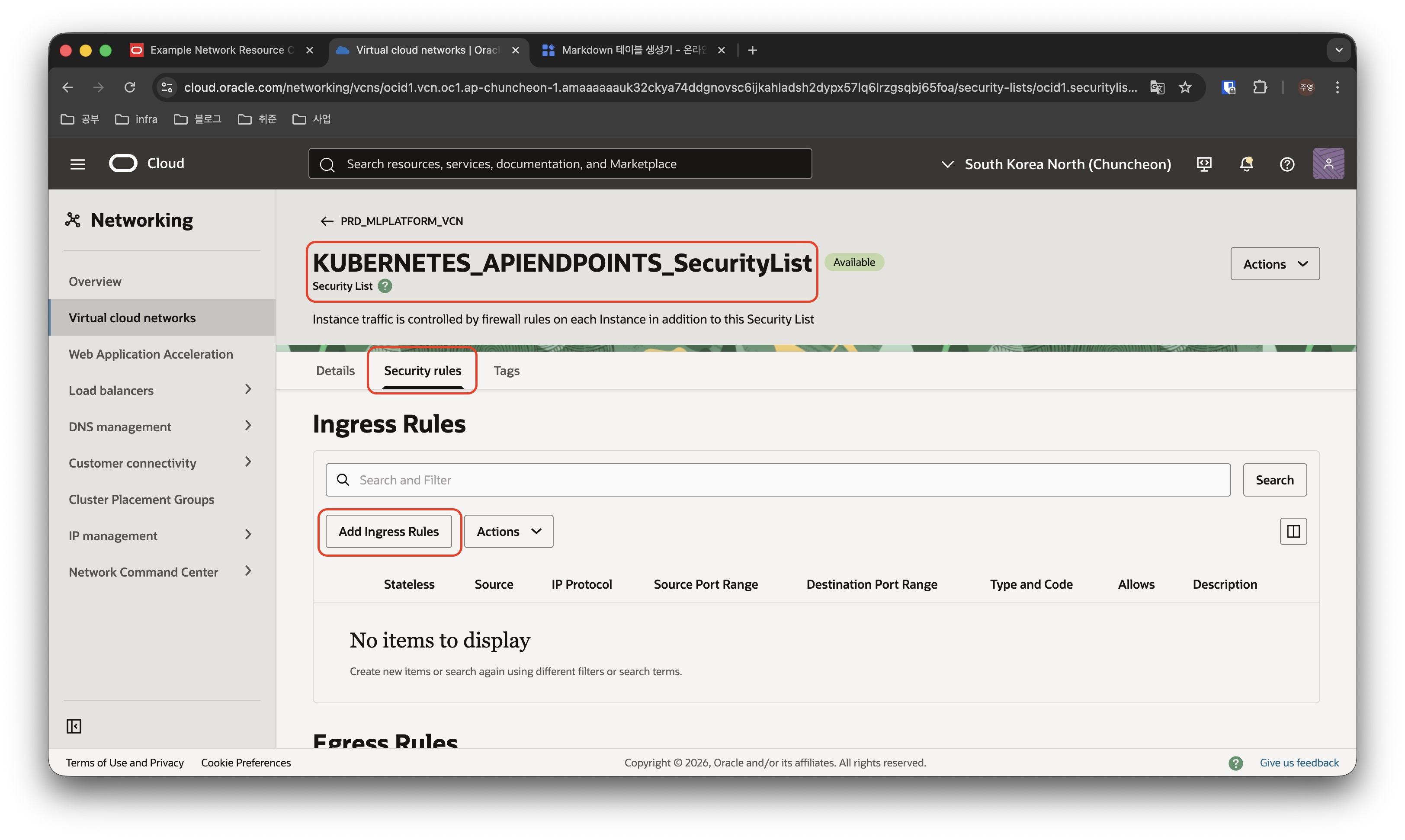
VCN의 Security 탭으로 가서 규칙을 추가할 Security List를 클릭하고, Security rules 버튼을 클릭한 후, “Add Ingress Rules” 또는 “Add Egress Rules” 버튼을 클릭하여 규칙을 추가합니다.
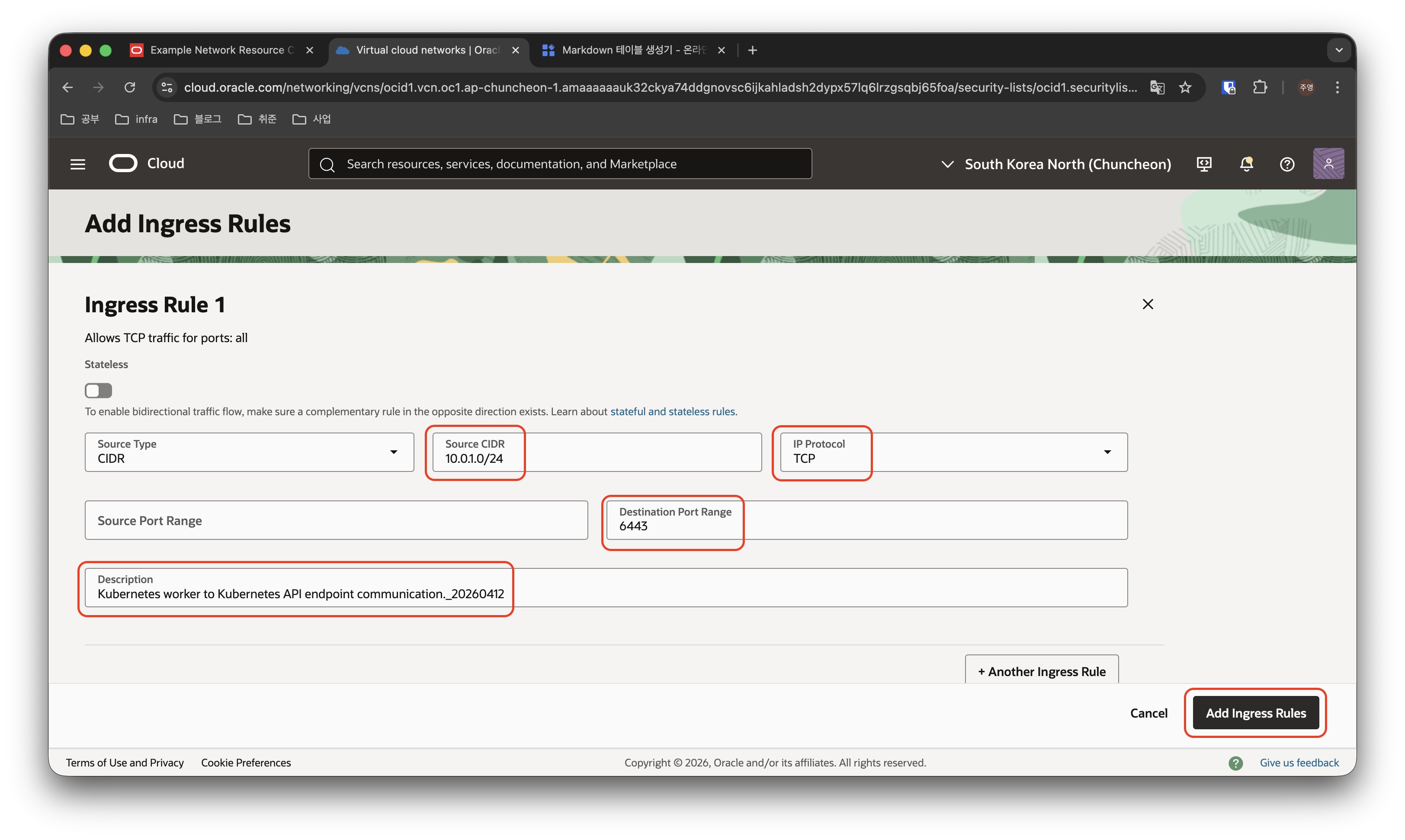
Security Rule을 추가하기 위한 Source CIDR, Protocol, Destination Port, Description 등을 입력후 “Add Rules” 버튼을 클릭하여 규칙을 추가합니다.
마찬가지 방식으로 아래의 룰을 모두 추가합니다.
| Security List | Type | State: | Source | Protocol / Dest. Port | Description: | ||||||
|---|---|---|---|---|---|---|---|---|---|---|---|
| KUBERNETES_APIENDPOINTS_SecurityList | Ingress Rules | Stateful | 10.0.1.0/24 (Worker Nodes CIDR) | TCP/6443 | Kubernetes worker to Kubernetes API endpoint communication. | ||||||
| KUBERNETES_APIENDPOINTS_SecurityList | Ingress Rules | Stateful | 10.0.1.0/24 (Worker Nodes CIDR) | TCP/12250 | Kubernetes worker to Kubernetes API endpoint communication. | ||||||
| KUBERNETES_APIENDPOINTS_SecurityList | Ingress Rules | Stateful | 10.0.1.0/24 (Worker Nodes CIDR) | ICMP 3,4 | Path Discovery. | ||||||
| KUBERNETES_APIENDPOINTS_SecurityList | Ingress Rules | Stateful | 10.0.32.0/19 (Pods CIDR) | TCP/6443 | Pod to Kubernetes API endpoint communication (when using VCN-native pod networking). | ||||||
| KUBERNETES_APIENDPOINTS_SecurityList | Ingress Rules | Stateful | 10.0.32.0/19 (Pods CIDR) | TCP/12250 | Pod to Kubernetes API endpoint communication (when using VCN-native pod networking). | ||||||
| KUBERNETES_APIENDPOINTS_SecurityList | Ingress Rules | Stateful | 10.0.0.0/24 (Bastions) | TCP/6443 | (optional) External access to Kubernetes API endpoint. | ||||||
| KUBERNETES_APIENDPOINTS_SecurityList | Egress Rules | Stateful | All |
TCP/ALL | Allow Kubernetes API endpoint to communicate with OKE. | ||||||
| KUBERNETES_APIENDPOINTS_SecurityList | Egress Rules | Stateful | All |
ICMP 3,4 | Path Discovery. | ||||||
| KUBERNETES_APIENDPOINTS_SecurityList | Egress Rules | Stateful | 10.0.1.0/24 (Worker Nodes CIDR) | TCP/10250 | Allow Kubernetes API endpoint to communicate with worker nodes. | ||||||
| KUBERNETES_APIENDPOINTS_SecurityList | Egress Rules | Stateful | 10.0.1.0/24 (Worker Nodes CIDR) | ICMP 3,4 | Path Discovery. | ||||||
| KUBERNETES_APIENDPOINTS_SecurityList | Egress Rules | Stateful | 10.0.32.0/19 (Pods CIDR) | ALL/ALL | Allow Kubernetes API endpoint to communicate with pods. |
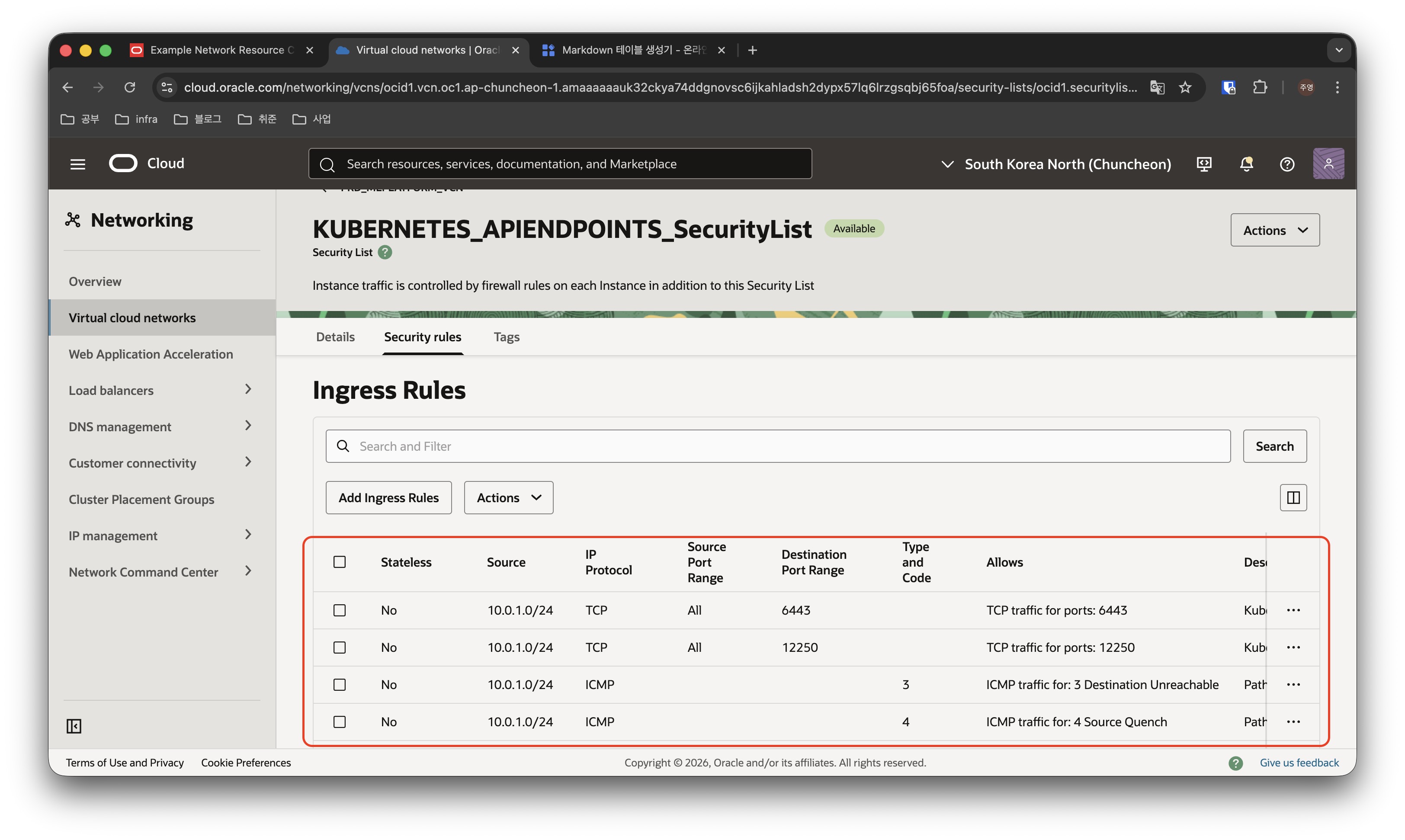
비슷한 방식으로 아래의 다른 규칙들도 추가해줍니다.
| Security List | Type | State: | Source | Protocol / Dest. Port | Description: | ||||||
|---|---|---|---|---|---|---|---|---|---|---|---|
| KUBERNETES_WORKERNODES_SecurityList | Ingress Rules | Stateful | 10.0.3.0/29 (Kubernetes API Endpoint CIDR) | TCP/10250 | Allow Kubernetes API endpoint to communicate with worker nodes. | ||||||
| KUBERNETES_WORKERNODES_SecurityList | Ingress Rules | Stateful | 0.0.0.0/0 | ICMP 3,4 | Path Discovery. | ||||||
| KUBERNETES_WORKERNODES_SecurityList | Ingress Rules | Stateful | 10.0.0.0/24 (Bastions) | TCP/22 | (optional) Allow inbound SSH traffic to managed nodes. | ||||||
| KUBERNETES_WORKERNODES_SecurityList | Ingress Rules | Stateful | 10.0.2.0/24 (Load balancer subnet CIDR) | ALL/30000-32767 | Load balancer to worker nodes node ports. | ||||||
| KUBERNETES_WORKERNODES_SecurityList | Ingress Rules | Stateful | 10.0.2.0/24 (Load balancer subnet CIDR) | ALL/10256 | Allow load balancer to communicate with kube-proxy on worker nodes. | ||||||
| KUBERNETES_WORKERNODES_SecurityList | Egress Rules | Stateful | 10.0.32.0/19 (Pods CIDR) | ALL/ALL | Allow worker nodes to access pods. | ||||||
| KUBERNETES_WORKERNODES_SecurityList | Egress Rules | Stateful | 0.0.0.0/0 | ICMP 3,4 | Path Discovery. | ||||||
| KUBERNETES_WORKERNODES_SecurityList | Egress Rules | Stateful | All |
TCP/ALL | Allow worker nodes to communicate with OKE. | ||||||
| KUBERNETES_WORKERNODES_SecurityList | Egress Rules | Stateful | 10.0.3.0/29 (Kubernetes API Endpoint CIDR) | TCP/6443 | Kubernetes worker to Kubernetes API endpoint communication. | ||||||
| KUBERNETES_WORKERNODES_SecurityList | Egress Rules | Stateful | 10.0.3.0/29 (Kubernetes API Endpoint CIDR) | TCP/12250 | Kubernetes worker to Kubernetes API endpoint communication. |
| Security List | Type | State: | Source | Protocol / Dest. Port | Description: | ||||||
|---|---|---|---|---|---|---|---|---|---|---|---|
| KUBERNETES_PODS_SecurityList | Ingress Rules | Stateful | 10.0.1.0/24 (Worker Nodes CIDR) | ALL/ALL | Allow worker nodes to access pods. | ||||||
| KUBERNETES_PODS_SecurityList | Ingress Rules | Stateful | 10.0.3.0/29 (Kubernetes API Endpoint CIDR) | ALL/ALL | Allow Kubernetes API endpoint to communicate with pods. | ||||||
| KUBERNETES_PODS_SecurityList | Ingress Rules | Stateful | 10.0.32.0/19 (Pods CIDR) | ALL/ALL | Allow pods to communicate with other pods. | ||||||
| KUBERNETES_PODS_SecurityList | Egress Rules | Stateful | 10.0.32.0/19 (Pods CIDR) | ALL/ALL | Allow pods to communicate with other pods. | ||||||
| KUBERNETES_PODS_SecurityList | Egress Rules | Stateful | All |
ICMP 3,4 | Path Discovery. | ||||||
| KUBERNETES_PODS_SecurityList | Egress Rules | Stateful | All |
TCP/ALL | Allow pods to communicate with OCI services. | ||||||
| KUBERNETES_PODS_SecurityList | Egress Rules | Stateful | 0.0.0.0/0 | TCP/443 | (optional) Allow pods to communicate with internet. | ||||||
| KUBERNETES_PODS_SecurityList | Egress Rules | Stateful | 10.0.3.0/29 (Kubernetes API Endpoint CIDR) | TCP/6443 | Pod to Kubernetes API endpoint communication (when using VCN-native pod networking). | ||||||
| KUBERNETES_PODS_SecurityList | Egress Rules | Stateful | 10.0.3.0/29 (Kubernetes API Endpoint CIDR) | TCP/12250 | Pod to Kubernetes API endpoint communication (when using VCN-native pod networking). |
| Security List | Type | State: | Source | Protocol / Dest. Port | Description: | ||||||
|---|---|---|---|---|---|---|---|---|---|---|---|
| KUBERNETES_LOADBALANCERS_SecurityList | Ingress Rules | Stateful | 0.0.0.0/0 | TCP / 80, 443 | (optional) Load balancer listener protocol and port. Customize as required. | ||||||
| KUBERNETES_LOADBALANCERS_SecurityList | Egress Rules | Stateful | 10.0.1.0/24 (Worker Nodes CIDR) | ALL/30000-32767 | Load balancer to worker nodes node ports. | ||||||
| KUBERNETES_LOADBALANCERS_SecurityList | Egress Rules | Stateful | 10.0.1.0/24 (Worker Nodes CIDR) | ALL/10256 | Allow load balancer to communicate with kube-proxy on worker nodes. |
| Security List | Type | State: | Source | Protocol / Dest. Port | Description: | ||||||
|---|---|---|---|---|---|---|---|---|---|---|---|
| DMZ_SecurityList | Egress Rules | Stateful | 10.0.3.0/29 (Kubernetes API Endpoint CIDR) | TCP/6443 | (optional) Allow bastion to access the Kubernetes API endpoint. | ||||||
| DMZ_SecurityList | Egress Rules | Stateful | 10.0.1.0/24 (Worker Nodes CIDR) | TCP/22 | (optional) Allow SSH traffic to worker nodes. |
Private OKE 클러스터 생성
위의 복잡한 네트워크 구성이 모두 끝났다면 이제 본격적으로 OKE 클러스터 자원을 생성합니다.
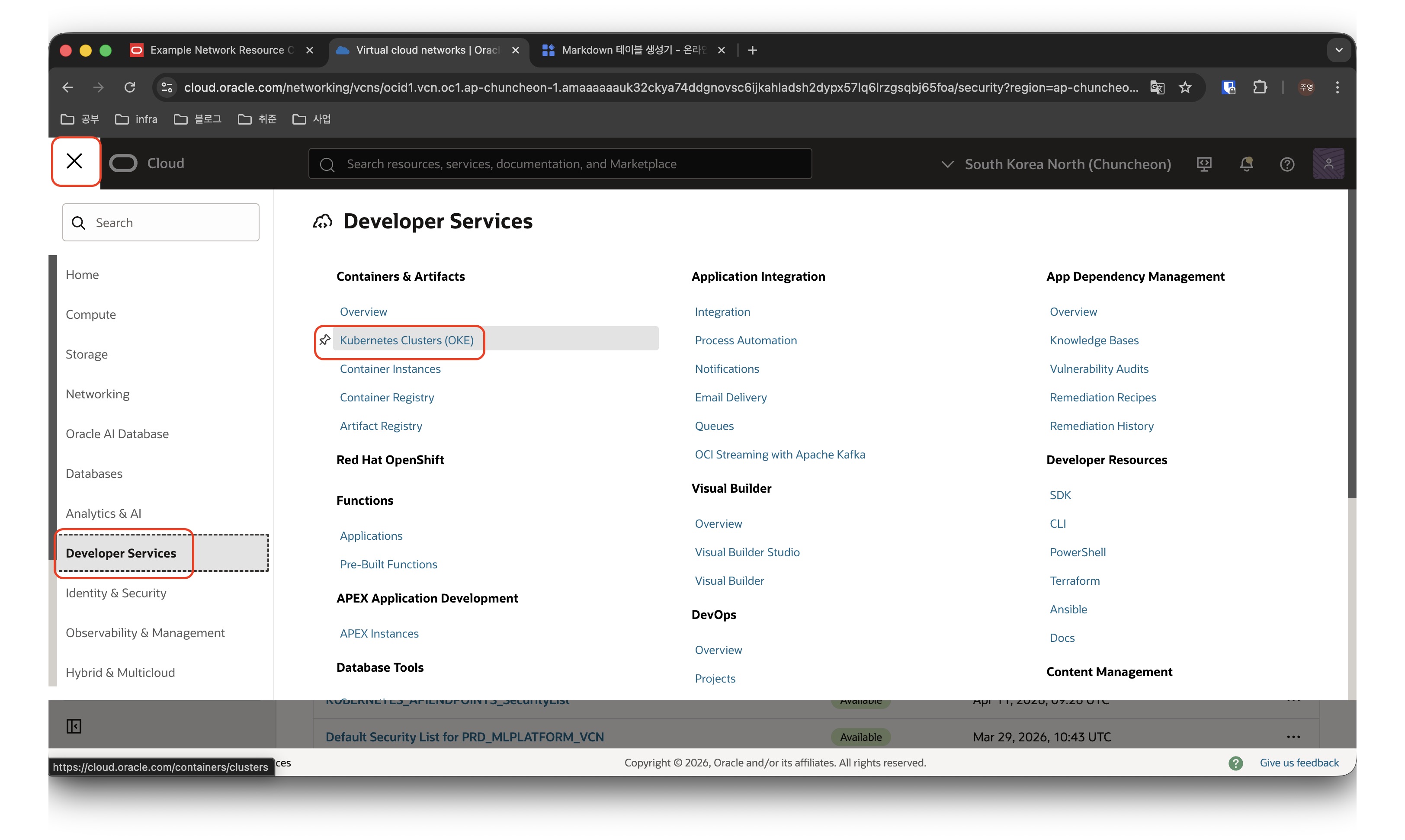
OCI 전체 메뉴에서 Developer Services 섹션에 있는 Kubernetes Clusters(OKE) 메뉴를 클릭합니다.
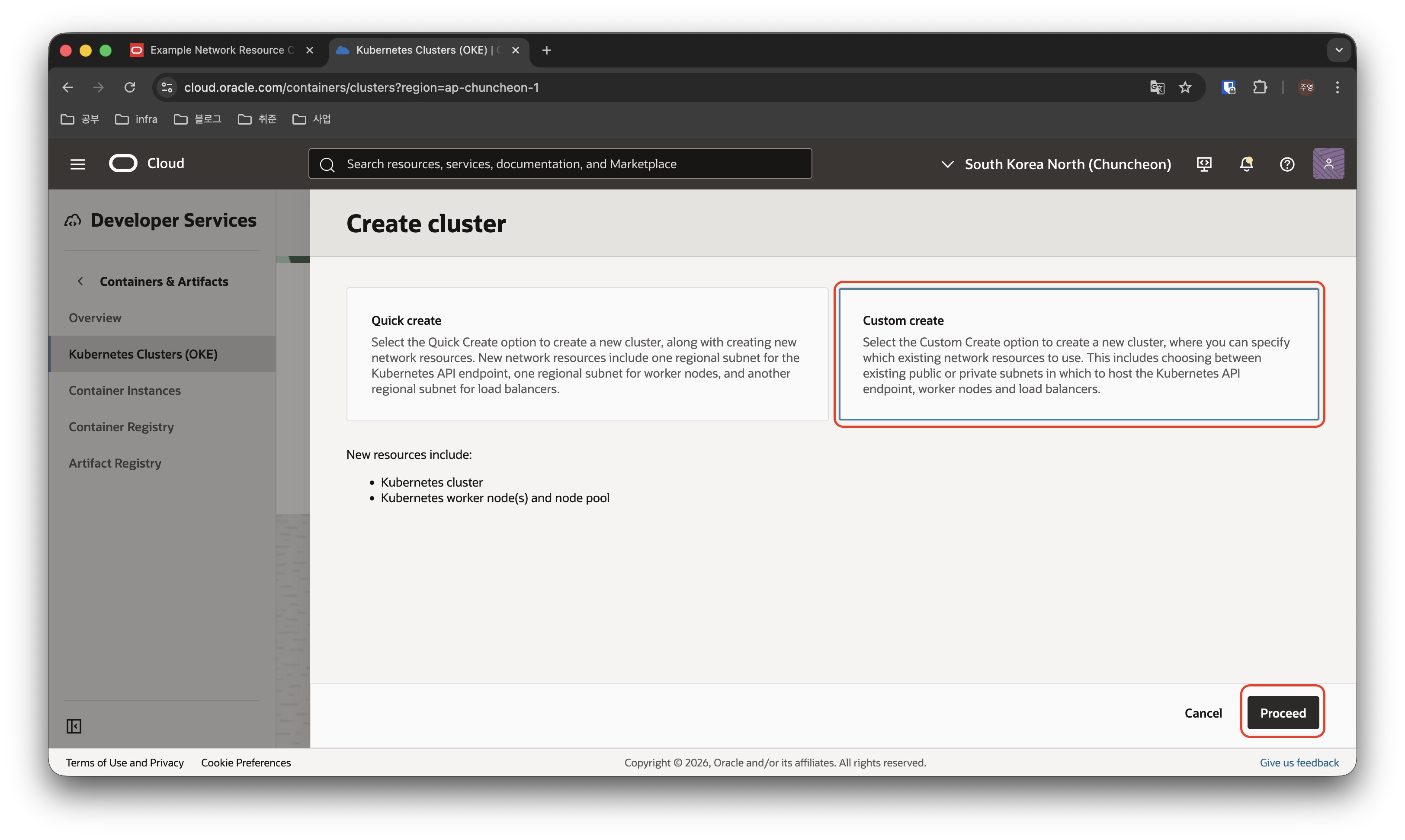
컴파트먼트가 올바르게 선택 되었는지 확인 후, “Create Cluster” 버튼을 클릭하고, 이어지는 화면에서 Custom create를 클릭하고 Proceed 버튼을 클릭합니다.
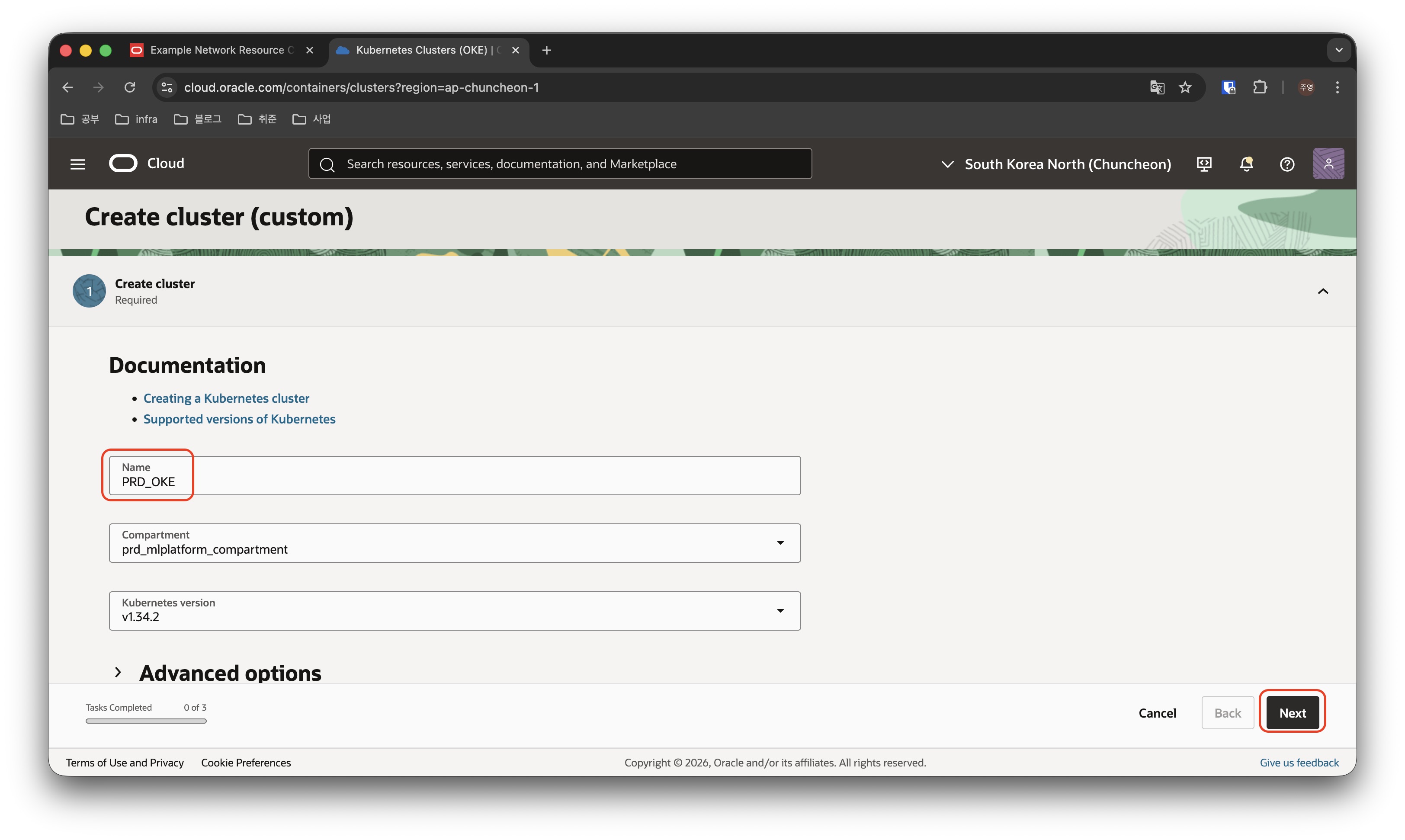
쿠버네티스 클러스터의 이름과 버전을 선택 후, Next를 클릭하여 다음 페이지로 이동합니다.
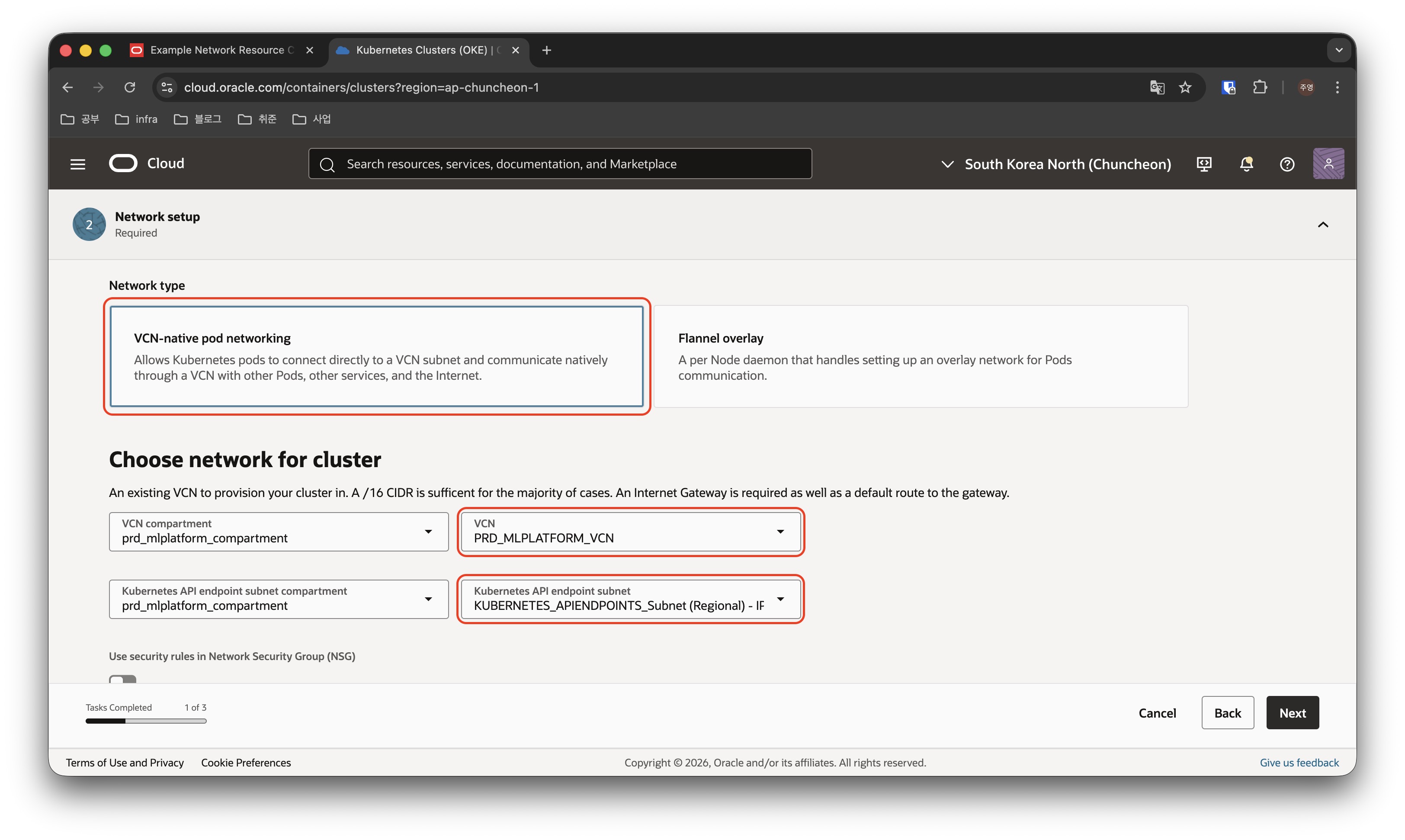
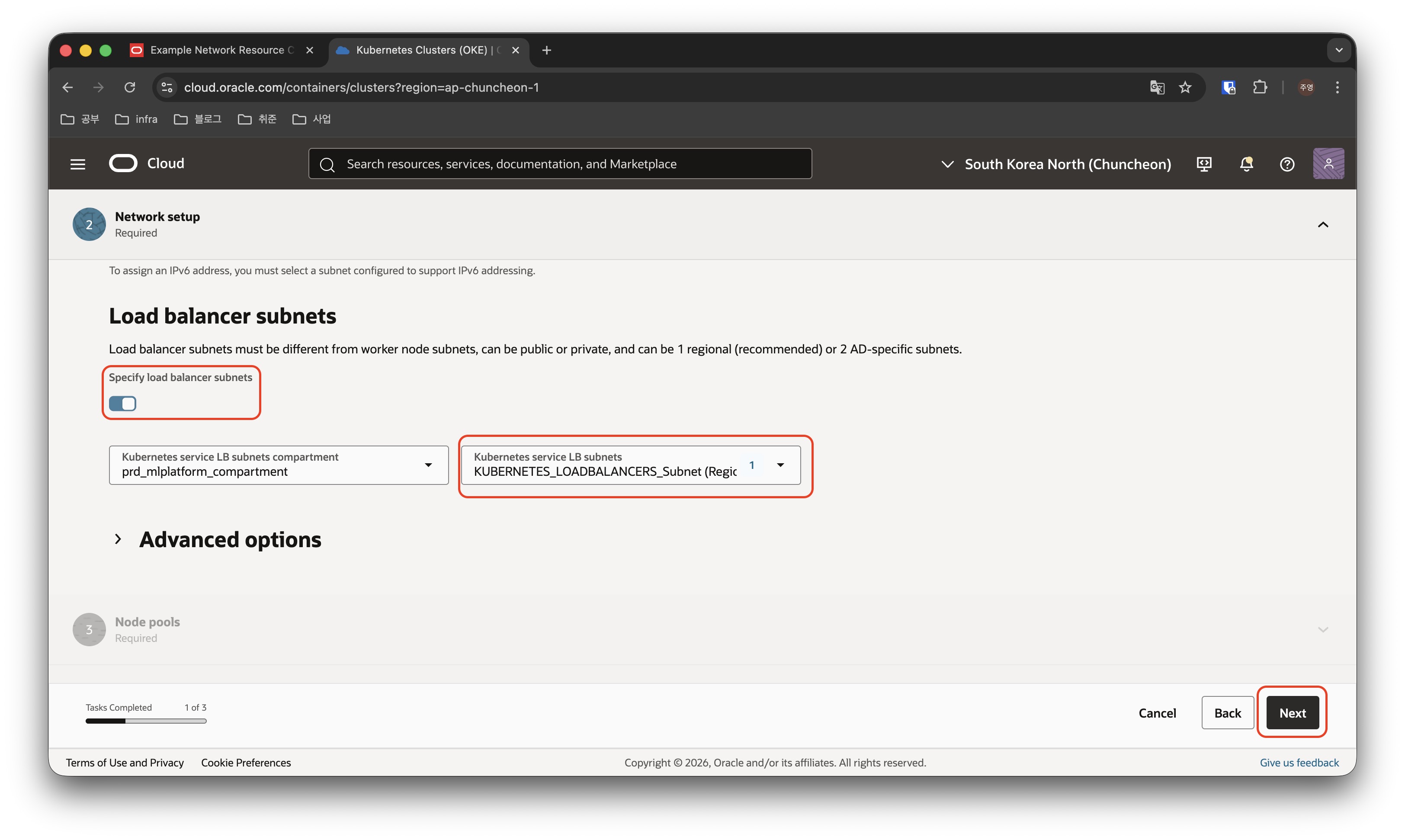
네트워크 타입을 “VCN-native pod networking”으로 선택 후, VCN과 API endpoint로 사용할 서브넷을 선택하고, Load balancer 용도로 사용할 서브넷도 명시한 뒤, Next로 다음 페이지로 이동합니다.
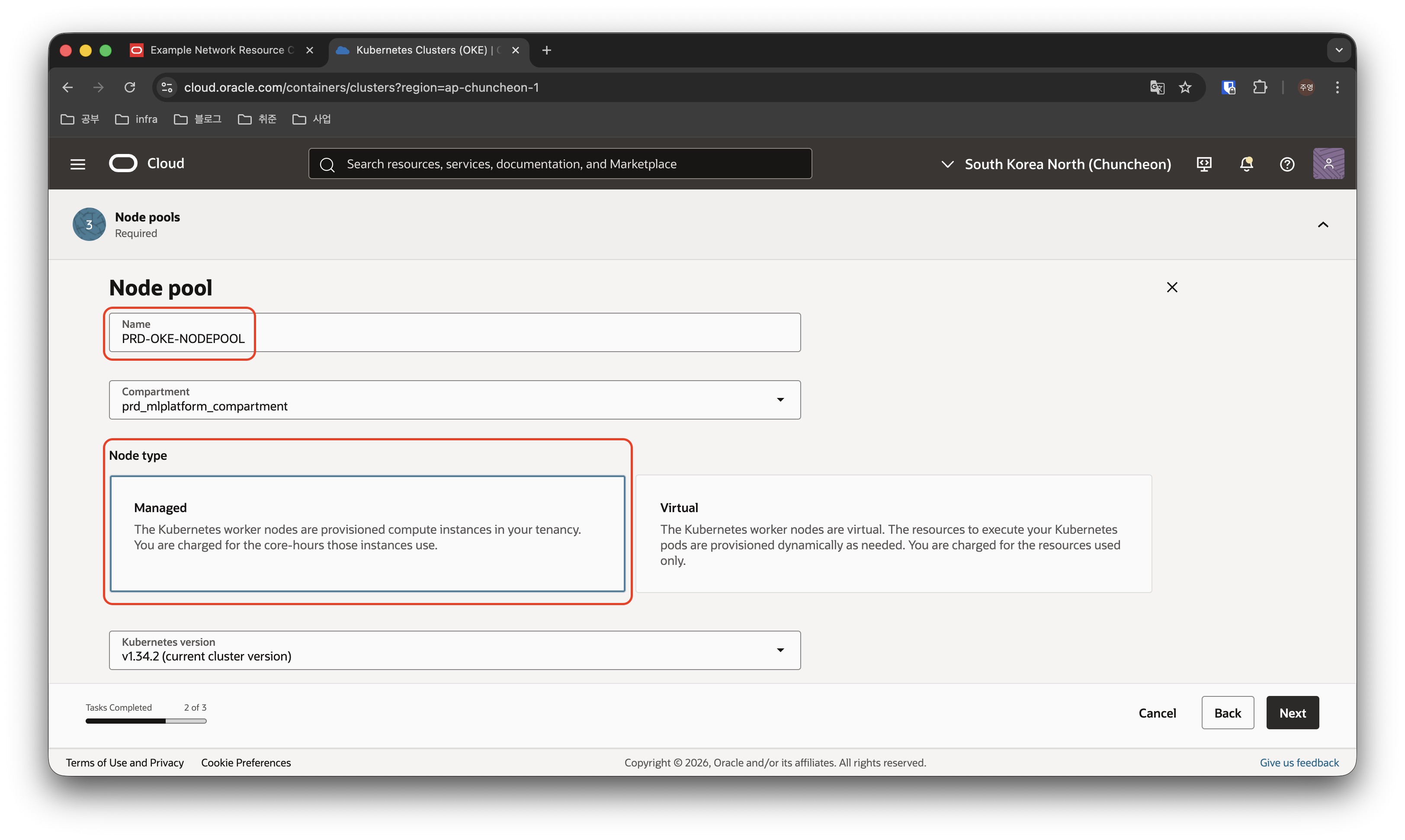
Nodepool의 이름을 명명하고, 무료로 사용하기 위해서 Node type은 Managed를 선택합니다.
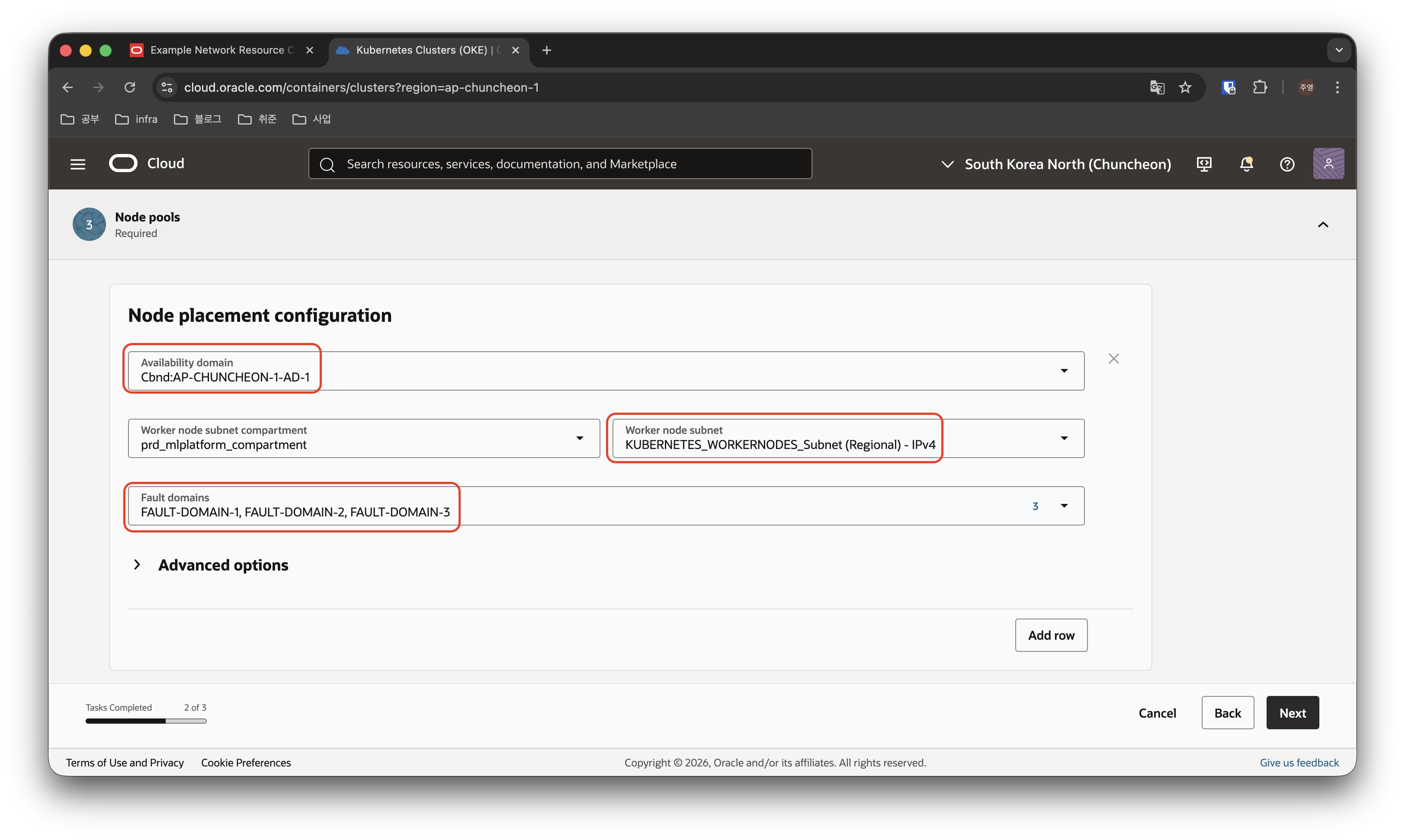
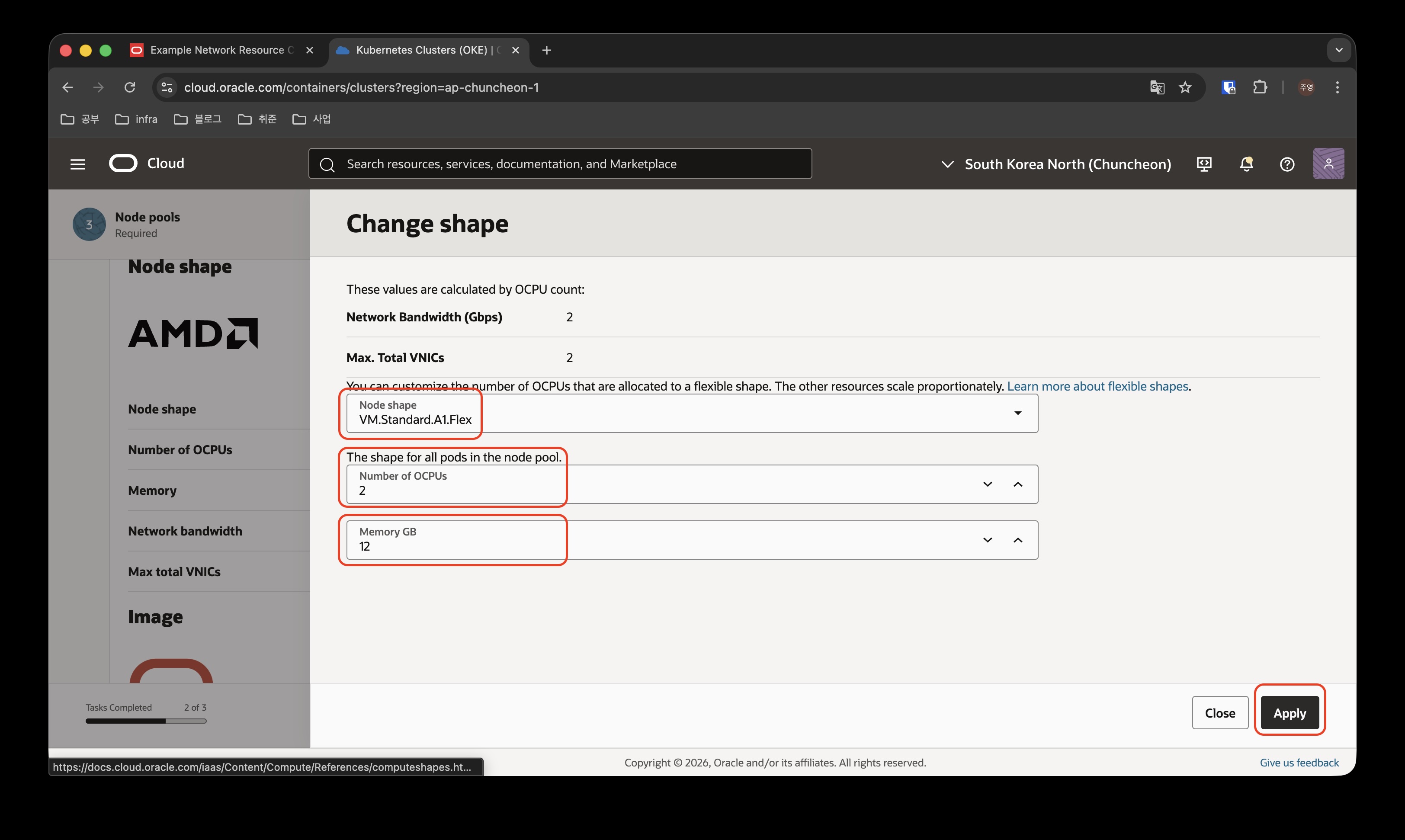
AD, FD와 Nodepool이 사용할 서브넷을 선택하고, Node가 사용할 shape와 이미지를 선택합니다.
무료로 사용하기 위해서, A1.Flex Shape을 사용하고, 2개 노드를 운영하기 위해서 각 노드는 2OCPU, 12GB Memory를 사용하도록 설정하였고, OS는 Oracle Linux를 그대로 사용하기로 하였습니다.
아래쪽에 등장하는 Node count 값은 2로 설정해줍니다.
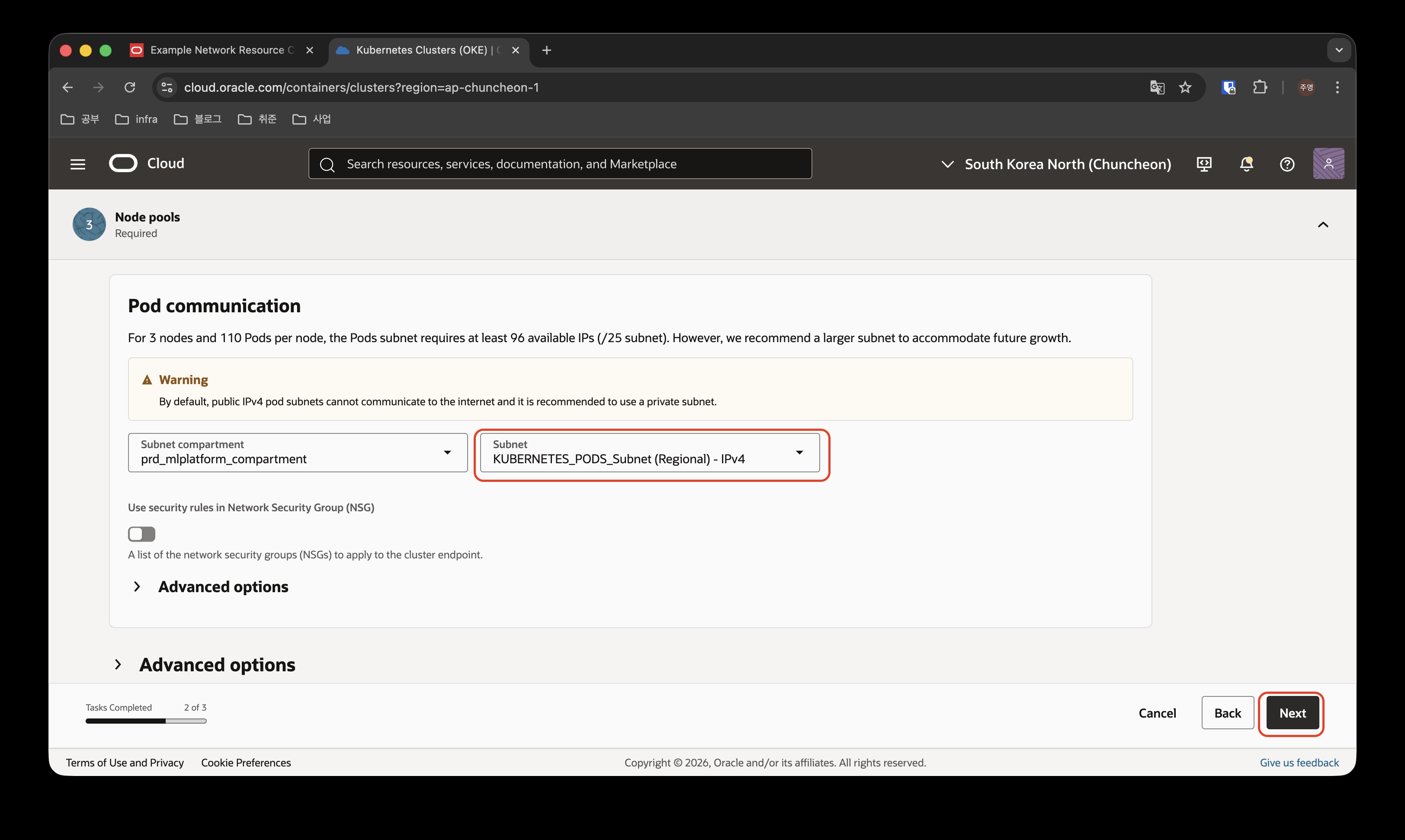
Pod communication에서는 POD가 사용할 서브넷을 선택한 후, Next를 클릭하여 다음 설정으로 넘어갑니다.
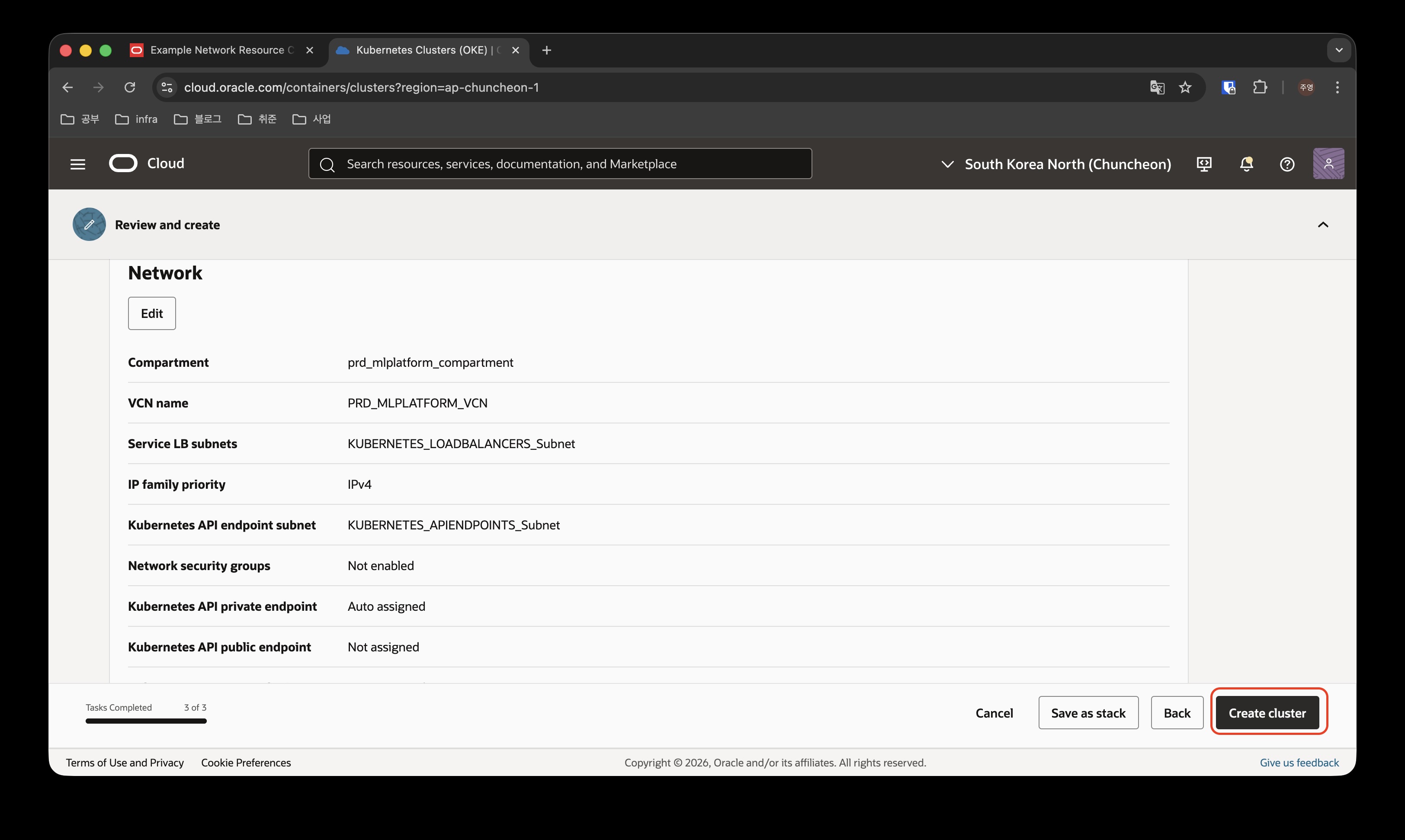
마지막으로 선택된 옵션들을 검토하고, 잘못된 내용이 없다면 Create_cluster를 클릭하여 OKE 클러스터를 생성합니다.
지금처럼 무료로 쿠버네티스 클러스터를 운영하기 위해서 A1.Flex 같은 SHAPE를 선택한 경우에는 NODE POOL을 생성할때 더이상 생성할 자원이 OCI 쪽에 없어서 NODE POOL CREATE가 실패하고 계속 NODEPOOL_RECONCILE Work Request가 쌓이게 되는데, 이것은 지속적으로 OCI에서 반복해서 생성 요청을 하는 것 같고, 조금 시간이 지나면 생성이 완료되는 것 같습니다.
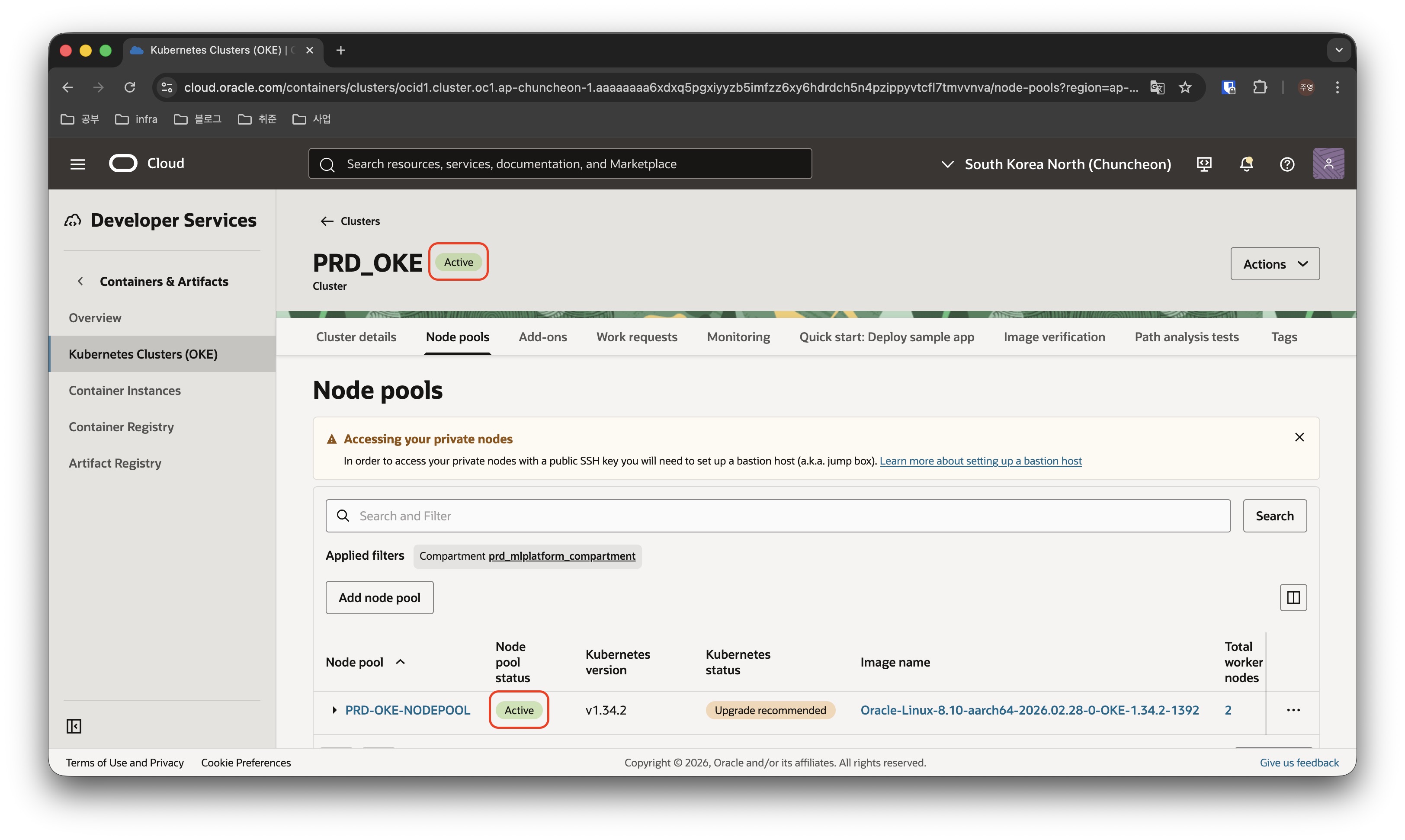
며칠정도 시간이 지나면 위 이미지와 같이 클러스터와 노드풀 모두 성공적으로 생성되어 Active 상태로 남아있게 되는 것을 확인할 수 있습니다.

최종적으로 위 이미지와 같은 네트워크가 구성되었습니다.
다음으로는 구성된 클러스터 위에 서비스를 배포해 보겠습니다.